Events and records
Read a run in four places: the hmz exec --json stream while an epic runs, the messages of an attached epic, the record on disk, and the notices the daemon raises when a run ends or asks for input.
The event stream
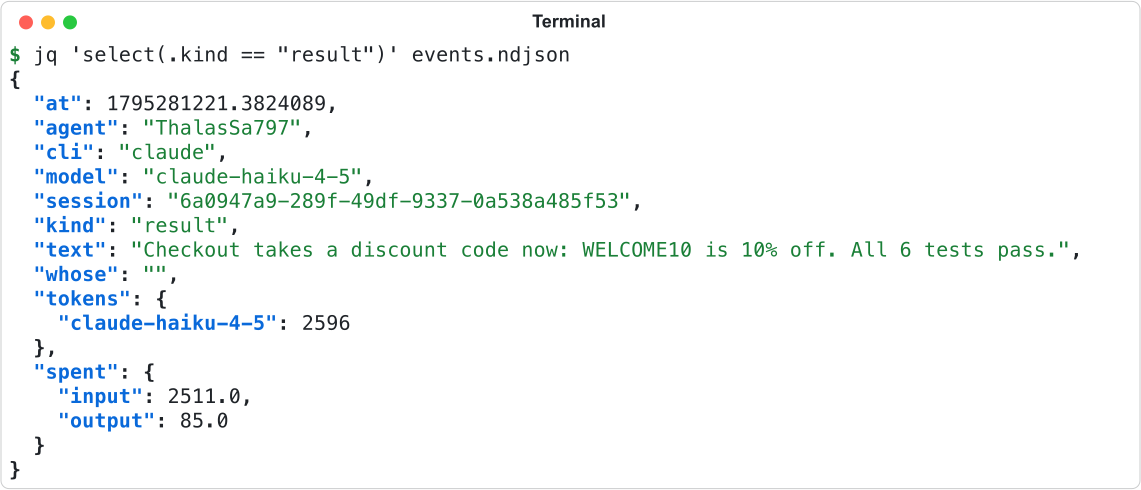
hmz exec --json writes NDJSON to standard output, flushing one JSON object per event as it happens. See The command line for usage and CLI for flags.


Keys
Every object carries these ten keys.
| Key | Type | Value |
|---|---|---|
at | number | Unix time the event was recorded. |
agent | string | The agent's own name, never the role it fills. |
cli | string | The harness. |
model | string | The model the agent was configured with. |
session | string | The harness's own id for the session. "" before it has one, and for an event not about one session. |
kind | string | One of the kinds below. |
text | string | The event's words. |
whose | string | For subagent and subagent-ends, the harness's id for the subagent. Otherwise "". |
tokens | object | On result, tokens by model, where the harness reports them. Otherwise {}. |
spent | object | On result, tokens by kind, where the harness reports them. Otherwise {}. |
Kinds
kind | When | text |
|---|---|---|
begins | A turn opens. | The prompt. |
text | The agent says something. | What it said. |
reasoning | The agent thinks aloud. | The thinking. |
tool | The agent uses a tool. | The tool's name, a space, then its arguments. |
subagent | The agent starts an agent of its own. | The subagent's name, a space, then what it was asked to do. |
subagent-ends | That subagent ends. | The same. |
asks | The agent or the flow asks its person a question. | The question. |
took | Words put into a running turn are now in front of the agent. | Those words. |
notice | Humanize acts on the turn: it waits out a rate limit, carries on under another account, or cuts the turn off. | What it is doing. |
result | The turn ends with an answer. Exactly one closes a turn. | The answer. |
failed | The turn ends without an answer. | What went wrong. |
ends | The turn closes. | "" |
The keys of spent are input, output, cache_read, cache_write and reasoning. A harness omits any kind it does not count.
Rules
- Nothing else reaches standard output. What the flow prints goes to standard error.
- The stream has no object for the end of the epic. The exit status says how it ended.
- Nobody is at the prompt: a question is answered at once, and its
asksevent is still written. - Only
hmz exechas--json.hmz chatdoes not.
Messages of an attached epic
epic.attach opens an epic subscription. Each message arrives as an epic.event notification, or as one item of for message in link in Python. See Daemon and wire for the methods and SDK for the link. Every message is a JSON object with a type key. Readers must ignore unknown types and keys.
Order
Besides workspace, slot and scratch, epic.attach takes replay (default true), since ({epoch, seq} or null) and figures (default false). The host sends these messages in order with nothing between them:
welcome.- Every kept history record, oldest first. With
replayset tofalse, none. Withsince, only records after thatseqifepochstill matches the host and all records are still kept; otherwise, all of them. - One snapshot of each kind, in order:
clients,claims,away,run,sessions,calls,waiting,pending,usage,board,envs. live.
After live, each history record and changed snapshot arrives as it happens. gone is the last message of a subscription.
type | Keys |
|---|---|
welcome | client, name, kind, workspace, slot, pid (the host's process), protocol, epoch (a text naming this life of the host). |
live | seq, that of the last history record, and elided, the number of records dropped from the front. |
figures | Only with figures set to true: after live, then at most once a second while it changes. run, elapsed, lasting, ended, agents, sessions, handovers, latest, spending, reckoning, tally. |
gone | why: let go, the host was closed, too far behind; attach again or the host went away. |
term, term_exit | The output of a terminal (term, data) and its end (term, status), sent only to the frontends that view it. They carry no seq and are not replayed. |
History records
Every history record has seq, an integer that increases by one with each record. Every record except printed has run, the number of its epic. A host keeps up to 32 MiB of records for the current or last epic. It drops the oldest records first and counts them in elided on live.
type | Keys |
|---|---|
started | kind (flow or chat), flow, ref, task, by, client, roles, names, outworlders, agents, envs, params, budget, profile_flow, profile_environment, backup, resume, began, at. |
opened | role, key (<agent>/<n>), agent, cli, model, counts, forks, person, kept, env, harness, mono, wall. |
event | key, mono, and the keys of the event stream, except that the harness's id for the session is ident, and session is key, or "" for an event not about one session. |
asked | question (q<n>), role, text, options, mode (ask or listen), key, schema (a JSON Schema, or null for text), context, face, session. |
answered | question, role, by, client, text. |
withdrawn | question, why: away or over. |
shown | role, session, context: blocks shown to a person with no question. |
said | text, key, by, client. |
refused | agent, text, because. |
unheld | agent, texts. |
dropped | given, queued, because: stopped or ended. |
shell | key, command, out, err, status: a ! command a chat ran. |
printed | text: one line printed in the host process. |
notice | text. |
stopping | by, client. |
ended | how (done, stopped, budget, refused, failed or crashed), why, mono, result (what the flow returned for done, otherwise null). |
env_used | env, by (the frontend's name), what, and path where one was named. |
In env_used, what is wrote, made, renamed, removed, opened a terminal, staged, unstaged, discarded, committed or rewound. The host writes one record for each change a frontend makes from the Files, Terminal and Changes panels.
Snapshots
The host keeps the latest snapshot of each kind and sends a new one whenever it changes.
type | Keys |
|---|---|
clients | clients: one {client, name, kind} per attached frontend. |
claims | claims: {role: client}. |
away | all (a boolean) and of ({role: boolean}). |
run | state (idle at first), the keys of started for the epic going or the last, stopping, epic, chat, slot, and for a chat turn. |
sessions | run, open (the keys still open), working (the keys with a turn open). |
calls | calls: one {ref, name, depth, since, id, parent} per flow call going. |
waiting | queued and given: lines said and not yet taken. |
pending | pending: the questions not yet answered, each with the keys of its asked, run and owner. |
usage | run, usage, budget. Sent at most once a second. |
board | items: one {key, value, about, whose, by, at} each, or null for an epic with no board. |
envs | envs: the environments of the epic. |
Records on disk
Each epic and chat keeps an append-only JSON Lines record on disk. See Files on disk for the rest of the directory.
| File | Record of |
|---|---|
epic.jsonl | One epic. |
epic.<flow>_<id>.jsonl | One call of a flow by a flow inside the epic. <id> is six hex digits. A flow called twice has two. |
chat.jsonl | One chat. |
Every line is a JSON object with event (the event name), at (the UTC time it was written, as in 2026-11-21T05:13:22.007Z), and that event's keys. The file is UTF-8 with non-ASCII characters escaped. Readers must ignore unknown keys and events.


Events of an epic record
event | Written when | Keys |
|---|---|---|
began | The epic begins. Always first. | See below. |
opened | A session's harness first states the session's id. | See below. |
called | The flow calls a flow. | flow (the called flow's reference), task, epic (the file name of the call record). |
returned | That call ends, however it ends. | flow and epic, equal to those of its called. |
usage | Just before each ended. | cost (US dollars, left out where it is not a finite number), output_tokens, seconds: what the budget counted since the record began or was last reopened. |
ended | The flow stops. | how: done, failed or stopped. |
backed | Each time the epic is backed up. | to (the target), ok, error ("" when ok), why: session, interval, end or manual. |
imported | The epic is imported or downloaded from a backup. | from (the archive's file name, or the backup it came from), head (the workspace commit the archive states, or ""). |
how is stopped when the flow was stopped from outside or ran out of budget, failed when it raised any other exception, and done otherwise.
Keys of began
| Key | Value |
|---|---|
kind | flow. |
flow | The flow as it was named. |
task | The task. |
workspace | The absolute path of the workspace. |
resumable | Whether the flow can be picked up. |
ref | The flow's canonical reference. Only where known. |
picked_up | The name of the epic this one resumes. Only for an epic that resumes another. |
agents | One object per role: agent (the role), name (the agent filling it), backend (the harness), model, effort, provider (the account, "" for none). |
envs | The env specs given, one per env. |
used | Where each env was placed. Only where it differs from envs. |
params | The params given to the flow. |
budget | duration (seconds), cost (US dollars), output_tokens and graceful. A limit that is not set is null; cost may also read "Infinity". graceful is a boolean, or an object with one boolean per limit. |
profile_flow | true. Only where the flow's Python is profiled. |
profile_environment | true. Only where the epic's processes are profiled. |
backup | The names of the epic's backup targets. Only where there are any. |
spelling | 2, the spelling envs and used follow. |
Keys of opened
| Key | Value |
|---|---|
agent | The agent's name, never its role. |
backend | The harness. |
provider | The account, or local for none. |
session | The id the harness gave the session. The same value as session in the event stream. |
name | <agent>-<backend>@<provider>-<session>. |
where | The directory that holds the session's files: sessions/<cli> inside the epic directory, or an absolute path. |
parent | The session this one was forked from. Only for a fork. |
harness | local, env or <backend>:<name>: where the harness ran. Only where the env is on another machine. |
A session whose harness never stated an id has no opened.
Events of a call record
A call record holds only began, opened, called, returned and ended. Its began has flow, task, workspace, resumable and under (the file name of the calling flow's record). Nested calls write to the called flow's record. Match each returned to its called by epic to reconstruct the call tree.
Events of a chat record
event | Written when | Keys |
|---|---|---|
began | The chat begins. Always first, and written once. | task (the first message), workspace, agents (one object, whose agent is assistant), and where they apply backup, prefer, permission, workdir, env, title, adopted, forked. |
set | The chat's preference, agent, permission, env or title changes, or it is archived or put back. | Any of prefer, agents, permission (here also workspace-write), env, title, archived (a boolean). |
opened | As in an epic record. | As in an epic record. |
reopened | The chat is carried on. | task, the message that carried it on. |
usage | Just before each ended. | As in an epic record. |
ended | The chat folds away. | how: stopped or failed. |
backed | As in an epic record. | As in an epic record. |
imported | The chat is downloaded from a backup. | As in an epic record. |
Key of began | Value |
|---|---|
prefer | native or flow. Only where the chat overrides the preference. |
permission | read-only or danger-full-access. Absent means workspace-write. |
workdir | The absolute path of the worktree the assistant works in. |
env | The env the chat began in, written as -e writes one after the role. In place of workdir. |
title | The title. Only for a fork and for a chat made from a harness session. |
adopted | <harness>:<id>, the harness session the chat was made from. |
forked | The name of the chat this one is a fork of. |
Read prefer, agents, permission, env, title and archived from the last event that sets them, including began. Without title, the title is the first line of task.
Reading a record
- A record has ended when an
endedfollows its lastreopened. An epic record never hasreopened. - A record with no such
endedis running or unfinished. It is running while a shared lock on.heldin its directory cannot be taken. - Total spend for an epic or chat is the sum of its
usageevents. backedandimportedmay follow the lastended.- Ignore
backuponbeganand everybackedbefore the lastimported. - Side questions are never recorded.
Notices
The daemon raises a notice when an epic or chat changes state. Read them over the daemon's methods; see Daemon and wire. Notifications describes how each interface displays them.
Kinds
kind | Raised when |
|---|---|
done | An epic ended done, or a chat finished a turn. |
failed | An epic or a chat failed or crashed, an epic ran out of budget, or an epic was refused after an interface asked to start it. |
stopped | An epic was stopped or forced. |
asked | A flow asked a person a question. |
listening | A flow waits for the next thing a person says. |
A chat never raises stopped or listening. An epic that runs out of budget raises failed here, even though its record says stopped.
Keys
| Key | Value |
|---|---|
id | An integer, greater than every id this machine raised before, across restarts of the daemon. |
kind | One of the kinds above. |
workspace | The workspace. |
slot | The host slot that holds the run. |
epic | The epic's name. "" for a chat. |
chat | The chat's name. "" for an epic. |
flow | The flow. chat for a chat. |
task | The task. |
role | The role a question concerns. Otherwise "". |
text | One line: the question, or the last line of why the run ended. May be "". |
at | Unix seconds when it was raised. |
Methods
| Method | Takes | Answers |
|---|---|---|
notices.list | after, an id; default 0. | notices, those kept after it, oldest first, and last, the newest id or 0. |
notices.subscribe | after, an id; absent for from now. | sub and last. Each notice then arrives as a notices.event notification with sub and notice. |
notices.unsubscribe | sub. | {} |
Rules
- The daemon keeps the latest 200 notices. Pass the last
idyou saw asafterto resume from there. - A subscription that falls too far behind ends with a
notices.eventwhosegonesays so in place ofnotice. Subscribe again. - State from before the daemon started is not noticed, and each question is noticed once.
- The daemon does not filter by kind. Each interface chooses which kinds to show.