Builder Guide
Write flows in Python with this guide. A flow is an async def function decorated with @flow that runs agents in environments, can ask the person, and can call other flows. If you are new to flows, start with Write your first flow.
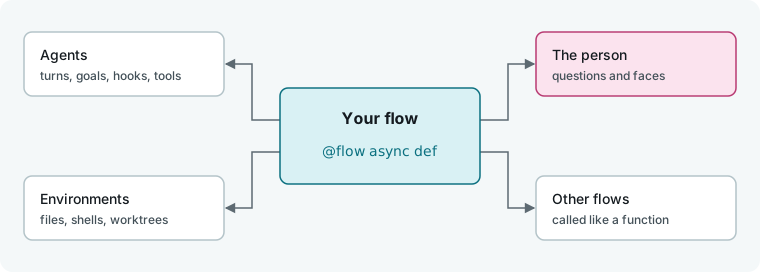
A flow
- Anatomy of a flow: use
@flow, define arguments, store flows, and run them. - Agent roles: declare agents, compare harnesses, and scope an agent to one job.
- Sessions and turns: start a session, run and steer a turn, read its output, and handle errors.
- Loops: loop in Python with fresh or persistent sessions, and decide when to stop.
- Params: declare typed parameters that render as a form in the app and
-pflags on the CLI. - Context, errors and cleanup: read
ctx, catch errors, and clean up when a run stops. - Budgets in a flow: read the epic budget, set call or turn budgets, and stop cleanly.
What you can ask an agent
- Goals: give the agent a goal and let it decide when it is done.
- Typed answers: request structured answers with validation and retries.
- Hooks: handle turn events like permission requests and agent questions.
- Tools the agent can call: expose flow functions as tools or add commands to
PATH. - Skills and permissions: attach skills and control what each role can read, write, and reach.
People
- The person as an agent: ask the person a question, show context, or stand in for them.
- Faces: render a question on a custom page.
Composing
- Concurrent turns: run turns and calls in parallel and gather their results.
- Call another flow: load a flow by reference and run it with its own budget.
- Branch a conversation: fork a session to try alternatives from one point.
- Resumable flows: save state so a flow resumes where it stopped.
Environments
- Environment roles: declare environments, run commands, and read and write files.
- Worktrees, clones and scratch: isolate an agent in a worktree, clone, or scratch directory, and take snapshots.
- Machines and moving sessions: specify machine requirements and move sessions between environments.
Ship it
- Test a flow: test a flow against scripted fake agents and assert on what it did.
- Publish and version a flow: add a manifest, cut releases, and list the flow in a flowverse.
- The Python SDK: start and track runs from your own Python code.
Next
- Tutorials: follow a complete job from nothing to a finished result.
- Flow API: look up every public name of
hmz.flows. - User Guide: learn how to run and manage flows in Humanize.