Run a flow every night in CI
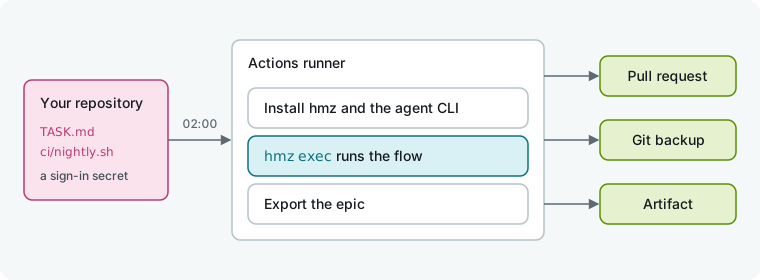
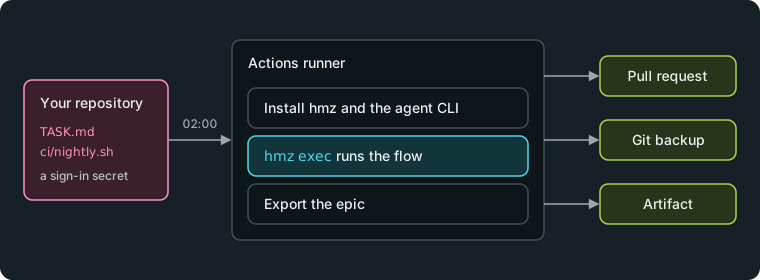
Set up a scheduled GitHub Actions job that runs a flow on your repository with hmz exec. The job stops at a budget, opens a pull request with the changes, and saves the run's events, an epic artifact, and a git backup.
What you need
- A GitHub repository cloned on your machine, with
hmzinstalled and a coding agent signed in. See Finish your first task in the terminal. - A headless authentication token for the agent's CLI. For Claude Code, run
claude setup-tokento print one. - An empty private repository for backups, such as
OWNER/epics, and a token with push access to it.
1. Write the task
Write the nightly task in TASK.md at the root of the repository. This one expects a checklist in TODO.md; write whatever fits your repository:
Do the first open item in TODO.md.2. Save the command in a script
Save this command as ci/nightly.sh. Because a CI runner starts empty and hmz exec does not install flows, reference the flow by its git repository and release tag:
#!/bin/sh
# What the nightly job runs. More options of `hmz exec` go after it: a budget is required.
hmz exec \
  -f 'git+https://github.com/humanfia/ralph-loop-flow@v0.1.0#ralph_loop' \
  -a agent=claude/claude-opus-4-1:high \
"$@" "$(cat TASK.md)"| Part | Meaning |
|---|---|
-f | The flow: ralph_loop at tag v0.1.0 of its repository. It repeats the task with one agent until the budget runs out. Find more flows in the catalogue. |
-a | The agent assignment for each role, as ROLE=CLI/MODEL:EFFORT. This flow has one role, agent. |
-e | The environment for each role, as ROLE=BACKEND[@PROVIDER][/WORKDIR]. Omit it here; the flow works in the current directory. |
"$@" | Extra options passed to the script, such as the budget, --json, and --backup. |
3. Test the script locally
Run the script on your machine with a small budget so it stops after a round or two:
sh ci/nightly.sh -p budget.output_tokens=200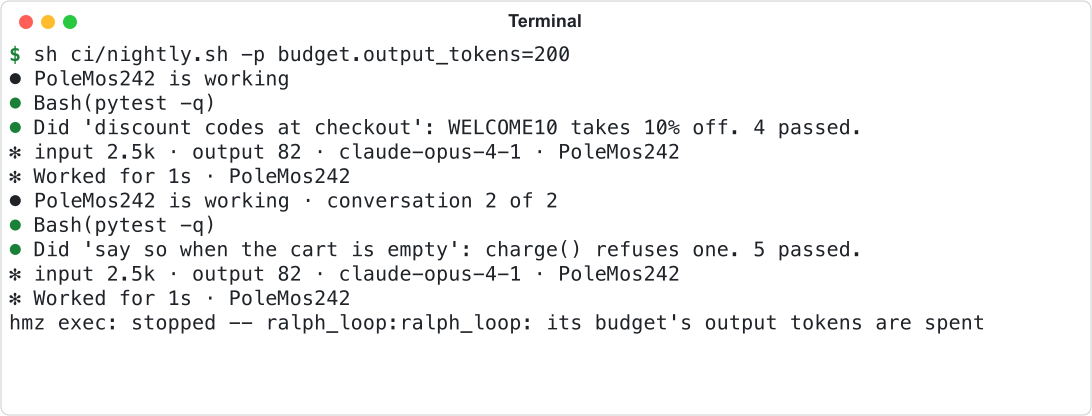
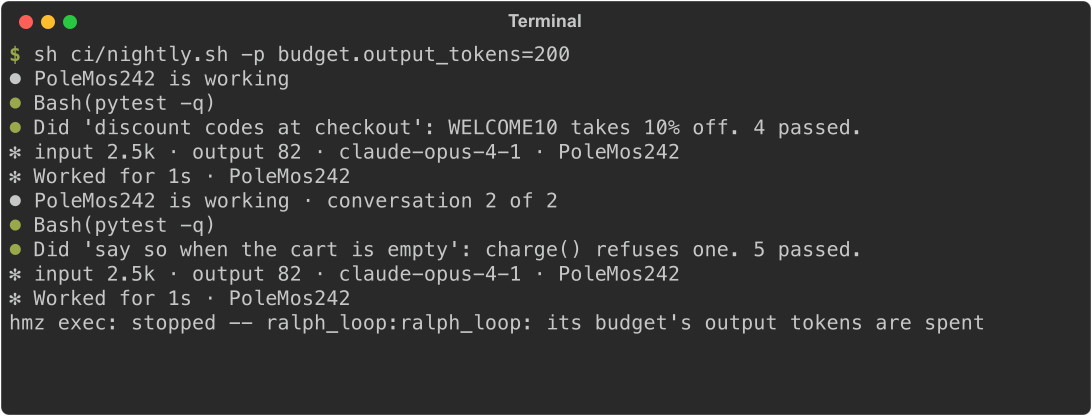
hmz exec writes progress to standard error and each turn's answer to standard output. The final line, hmz exec: stopped, shows that the budget ended the run cleanly with exit status 0.
Every hmz exec command requires at least one -p budget: budget.duration, budget.cost (in US dollars), or budget.output_tokens. Run the script without a budget to see hmz exec refuse the command before starting an agent, exiting with status 2:
sh ci/nightly.sh

4. Add the repository secrets
Add the credentials to GitHub so the agent's CLI can sign in on the runner.
- On GitHub, open the repository's Settings, then Secrets and variables, then Actions.
- Click New repository secret and add
CLAUDE_CODE_OAUTH_TOKENwith the token fromclaude setup-token. - Click New repository secret again and add
EPICS_TOKENwith the token that can push to your backup repository. - Open Settings, Actions, General, and enable Allow GitHub Actions to create and approve pull requests so the job's final step can open a pull request.
WARNING
The agents run unattended with the job's access: its token, its secrets, the network. Give the job only the permissions and secrets it needs. See Security.
5. Add the workflow
Save this workflow as .github/workflows/nightly.yml, replacing OWNER/epics with your backup repository:
name: nightly

on:
  schedule:
    - cron: "0 2 * * *"
  workflow_dispatch:

permissions:
  contents: write
  pull-requests: write

jobs:
  nightly:
    runs-on: ubuntu-latest
    timeout-minutes: 60
    steps:
      - uses: actions/checkout@v7
      - uses: astral-sh/setup-uv@v7

      - name: Install Humanize and the agent's CLI
        run: |
          uv venv --python 3.12 "$RUNNER_TEMP/hmz"
          uv pip install --python "$RUNNER_TEMP/hmz/bin/python" hmz
          echo "$RUNNER_TEMP/hmz/bin" >> "$GITHUB_PATH"
          npm install -g @anthropic-ai/claude-code

      - name: Add the backup target
        env:
          EPICS_TOKEN: ${{ secrets.EPICS_TOKEN }}
        run: |
          mkdir -p ~/.hmz
          cat > ~/.hmz/settings.yaml <<EOF
          backup:
            targets:
              - name: nightly
                url: https://x-access-token:${EPICS_TOKEN}@github.com/OWNER/epics.git
                policies: [end]
          EOF

      - name: Run the flow
        env:
          CLAUDE_CODE_OAUTH_TOKEN: ${{ secrets.CLAUDE_CODE_OAUTH_TOKEN }}
        run: |
          sh ci/nightly.sh \
            -p budget.duration=45m,budget.cost=20 \
            --backup nightly \
            --json > "$RUNNER_TEMP/events.ndjson"

      - name: Print the events
        if: always()
        working-directory: ${{ runner.temp }}
        run: jq -r '[.kind, .text] | @tsv' events.ndjson

      - name: Export the epic
        if: always()
        run: python ci/export.py

      - uses: actions/upload-artifact@v7
        if: always()
        with:
          name: epic
          path: |
            ${{ runner.temp }}/*.hmzepic
            ${{ runner.temp }}/events.ndjson

      - uses: peter-evans/create-pull-request@v8
        with:
          branch: nightly/${{ github.run_id }}
          title: "nightly: what the flow changed"
The job runs at 02:00 UTC. It installs Humanize into a dedicated environment and adds its bin directory to PATH so subsequent steps find hmz and python. The budget stops the run at 45 minutes or 20 dollars, whichever comes first. Keep timeout-minutes higher than the duration budget to leave time for installation. Because the run is non-interactive, any question the flow asks is answered immediately with its default.
6. Read the events
Pass --json to make hmz exec write the run to standard output as NDJSON, one object per event. The workflow saves this stream to a file and prints a line per event with jq:
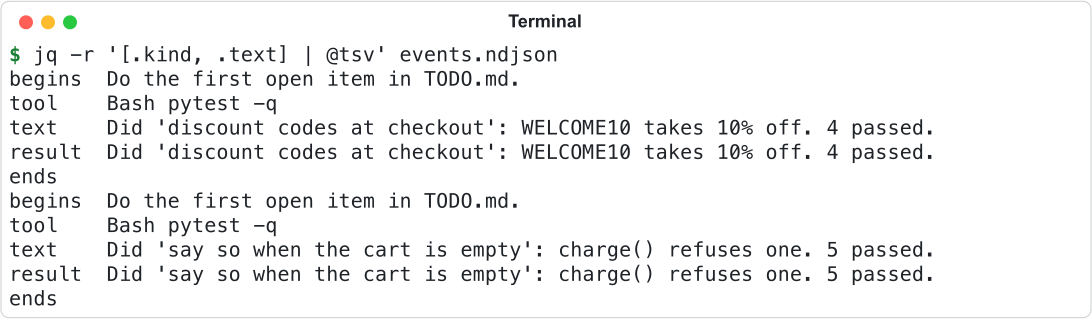
Every event object has the same ten keys, including kind, text, agent, and spent. Each turn starts with begins, ends with ends, and reports what it spent in result. See Events and records.
7. Export the epic as an artifact
Save this script as ci/export.py to bundle the newest epic into a single .hmzepic file with recognized secrets redacted:
"""Export the newest epic of this directory as one .hmzepic file."""

import os

from hmz.sdk import Hmz

epics = Hmz().epics
archive, manifest = epics.bundled(
    epics.all()[-1], output=os.environ.get("RUNNER_TEMP", ".")
)
print(f"{archive.name}: {len(manifest['sessions'])} sessions")

The job uploads this file, together with events.ndjson, as the epic artifact. Download it from the GitHub Actions run page, then open Search in the app and choose Import to inspect the run locally. See Export and import a run.
8. Back up the epic to git
The workflow configures a backup target named nightly in settings.yaml with the end policy, which backs up the epic when the run finishes. Passing --backup nightly sends the epic to that repository, and hmz exec waits up to 60 seconds for the push to finish before exiting.
To inspect the backups on your machine, add the nightly target to your local ~/.hmz/settings.yaml with a url your git client can access, then list the contents:
hmz backup --list

Run hmz backup --pull with the epic's name to download it. See Back up to git.
9. Run the workflow
- Commit the four files and push them to GitHub.
- Open the Actions tab, select nightly, and click Run workflow (enabled by
workflow_dispatch). - Check the first run before leaving it to the nightly schedule.
The step succeeds or fails based on the exit status of hmz exec:
| Status | Meaning |
|---|---|
0 | The flow completed or reached its budget. The workflow opens the pull request. |
1 | The run failed, for example because the agent's CLI could not sign in. Standard error shows the reason. |
2 | hmz exec refused the command before starting an agent due to a missing budget, an unassigned role, or a missing flow. |
130, 143 | The job was cancelled. hmz exec stopped the epic on the signal and exited with 128 plus the signal number. |
What you did
- Saved an
hmz execcommand in a script and tested it locally with a small budget. - Passed a repository secret to sign in the agent's CLI on the runner.
- Scheduled the flow in GitHub Actions under a time and cost budget.
- Saved each run as NDJSON events, an exported epic artifact, and a git backup.
Next
- The command line: every part of an
hmz execline. - Budgets: what each limit does when it is reached.
- Read back, export and share a run: what to do with the artifact.
- CLI reference: every flag and exit status.