Typed answers
Pass a pydantic model as output_schema to get an instance of that model back instead of text. Your flow then branches on a field instead of parsing prose.
Ask an agent for a model
Define the model and pass it to run. The agent receives the fields, types, and each description as a JSON Schema, so you do not need to repeat them in the prompt.
# .hmz/flows/checked/__init__.py
import pydantic

from hmz.flows import (
    Agent,
    AgentCollection,
    EnvCollection,
    FlowContext,
    FlowParams,
    LocalEnv,
    OutputSchemaError,
    flow,
)


class Check(pydantic.BaseModel):
    """What the checker found."""

    passed: bool = pydantic.Field(description="True only if nothing is left to fix.")
    notes: str = pydantic.Field(description="What to fix, said to the coder as it is.")


class Agents(AgentCollection):
    coder: Agent
    checker: Agent


class Envs(EnvCollection):
    workspace: LocalEnv


@flow(agents=Agents, envs=Envs, params=FlowParams)
async def checked(
    task: str, *, agents: Agents, envs: Envs, params: FlowParams, ctx: FlowContext
) -> bool:
    """A coder works until a checker passes the change."""
    coder, checker = agents["coder"], agents["checker"]
    workspace = envs["workspace"]
    work = await coder.spawn()
    await coder.run(task, session=work, env=workspace)
    for _ in range(3):
        try:
            check = await checker.run(
                "Check the change in this repository.",
                session=await checker.spawn(),
                env=workspace,
                output_schema=Check,
            )
        except OutputSchemaError:
            continue  # not a Check: ask again
        if check.passed:
            return True
        await coder.run(check.notes, session=work, env=workspace)
    return False
check is a Check, so a type checker knows check.passed is a bool and check.notes is a str.
Run the flow. You see the checker answer with a JSON object matching the model:
hmz exec -f @local/checked -a coder=claude/claude-haiku-4-5 \
    -a checker=claude/claude-haiku-4-5 -p budget.output_tokens=20000 \
    "Add a coupon code to checkout"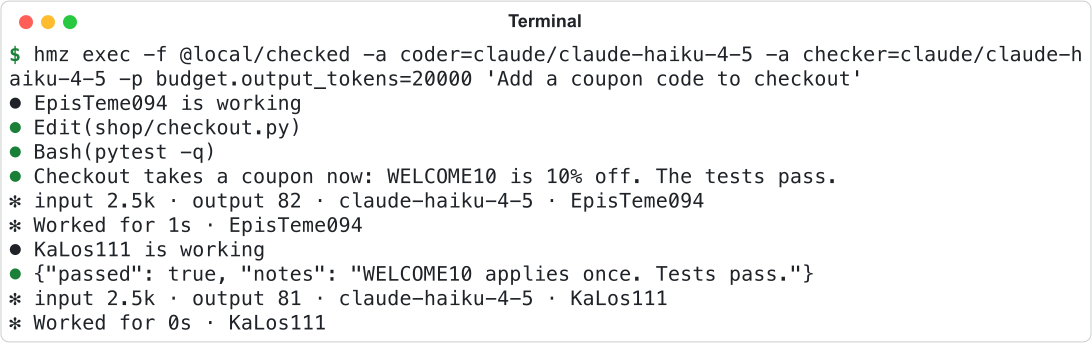
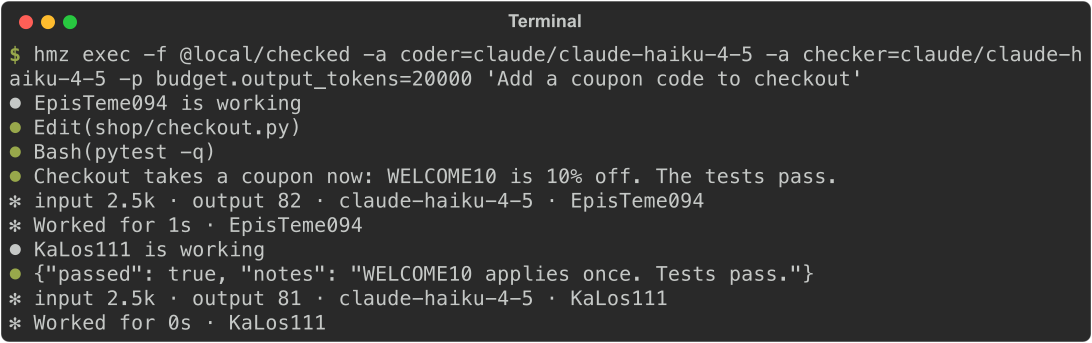
The checker's last message is the JSON that run reads as a Check.
Handle invalid answers
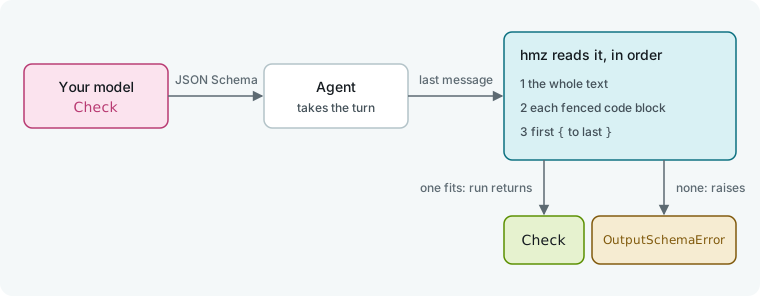
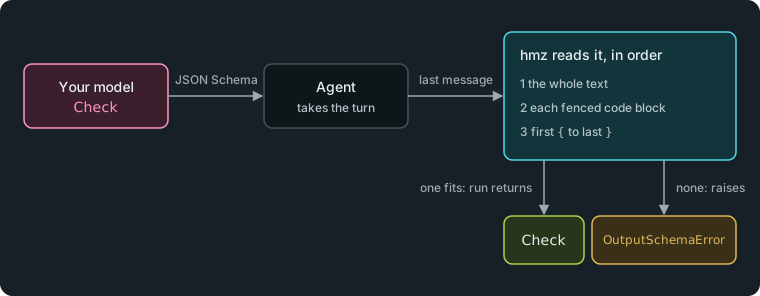
hmz parses the agent's last message as JSON and validates it against the model. It tries three spans in order and returns the first that validates:
- The whole text, with surrounding whitespace removed.
- Each fenced code block in the text.
- The span from the first
{to the last}.
If none validates, run raises OutputSchemaError. hmz does not retry automatically; your flow decides whether to ask again. The flow above catches the error and asks again, for three checks in all. OutputSchemaError is both a HarnessError and a ValueError, so catching HarnessError covers it.
How an agent receives the schema depends on its harness:
| The schema is | Harness (-a) |
|---|---|
| enforced by the harness | claude, codex, agy, grok, mcode, qwen, litellm |
| added to the prompt | cursor-agent, opencode, mimo, kimi, pi, omp, dsh, acp |
litellm enforces the schema only for a model it knows accepts one; for any other model it adds the schema to the prompt. Prompt-only harnesses can still answer out of shape, so keep the retry loop.
Ask a person for a model
Pass output_schema to an Outworlder turn. The person sees the model as a form, and run returns the validated instance.
from typing import Literal


class Release(pydantic.BaseModel):
    """What the person decides."""

    action: Literal["ship", "hold", "revert"] = pydantic.Field(
        description="What to do with the change."
    )
    announce: bool = pydantic.Field(description="Post it to the changelog")
    risk: int = pydantic.Field(ge=1, le=5, description="1 is safe, 5 is risky.")
    notes: str = pydantic.Field("", description="Anything the team should know.")


decision = await human.run(
    "Release this change?", session=await human.spawn(), output_schema=Release
)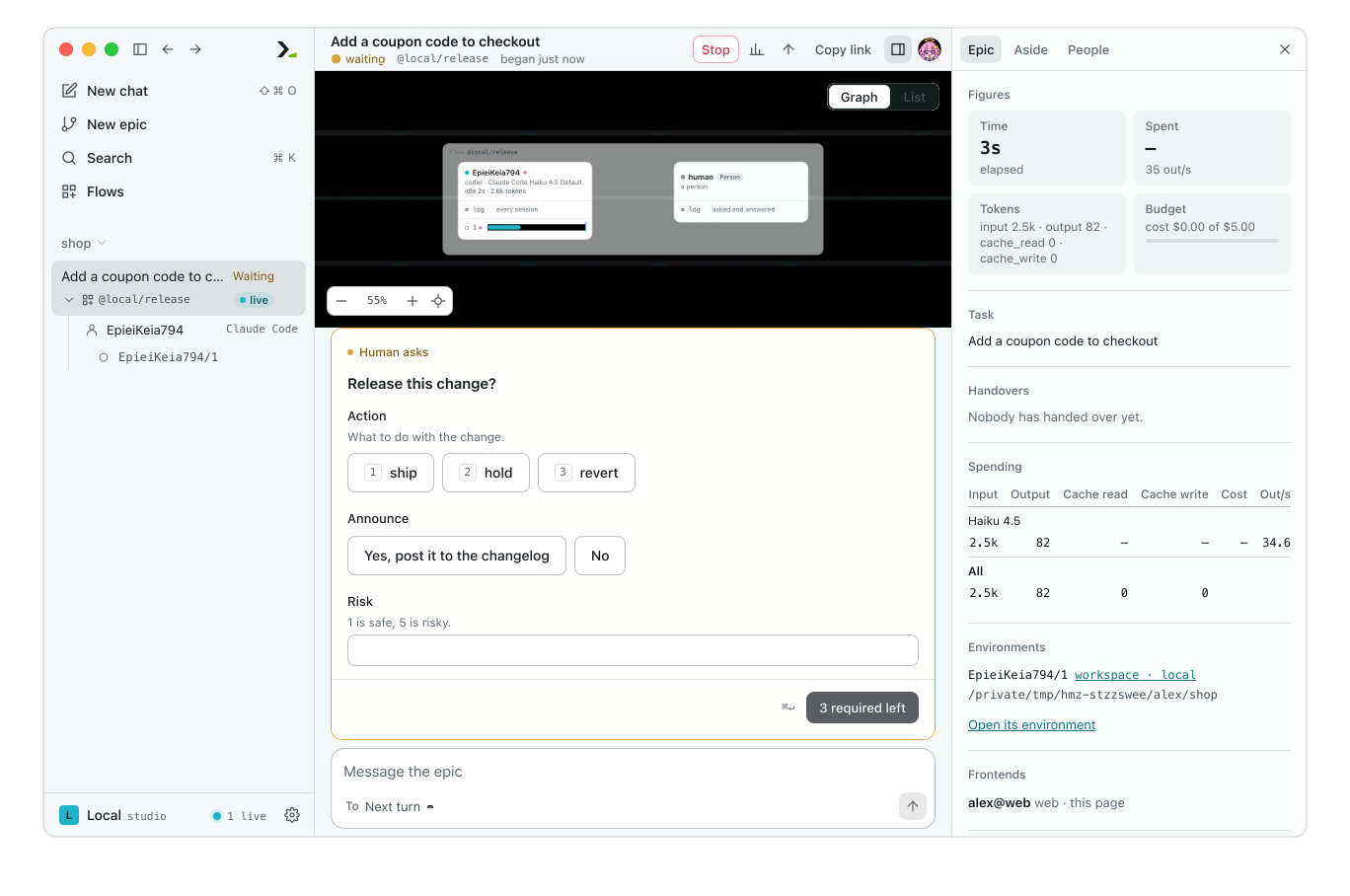
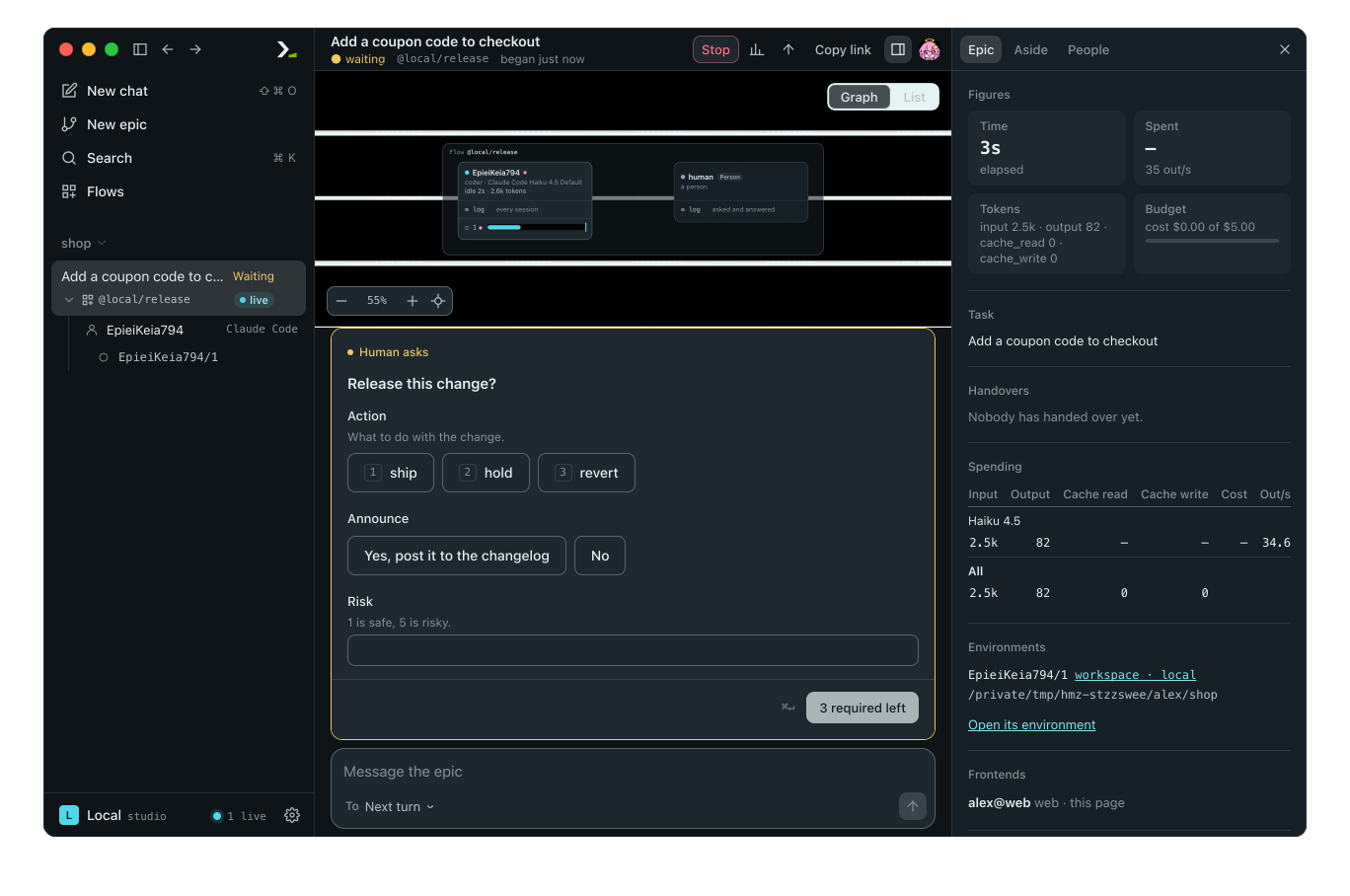
The form is drawn from Release.
The host validates the submission against the model. Invalid values show an error beside the field, and the question stays open until the input is valid. run does not raise OutputSchemaError for a person answering in the app or the terminal.
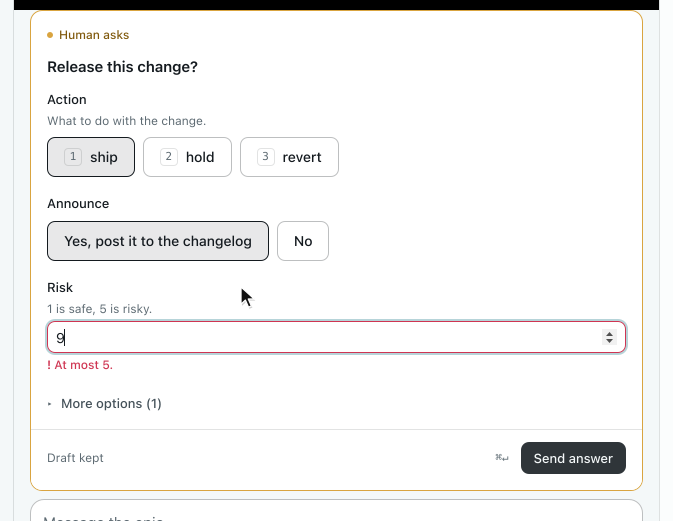
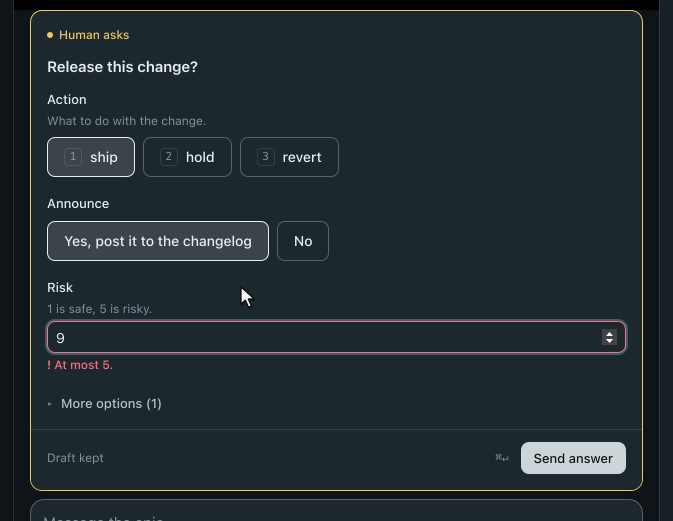
Setting le=5 on the field enforces the limit.
If the person is away—which is always true under hmz exec—the turn finishes immediately. It returns the model built from its defaults if every field has one, or raises OutworlderAway. Release has required fields, so it raises. See The person as an agent.
Shape the form
Each field in the model renders as a form control based on its type. The terminal interface draws the same model as a terminal form; see Answer a flow's questions.
| Field in the model | Control in the app |
|---|---|
Literal or an enum, up to 5 values | Buttons side by side |
Literal or an enum, more than 5 values | A list to pick from, with a search box past 12 |
bool | Two buttons. A short description words the yes: Yes, post it to the changelog |
int, float | A number box. ge, le, gt, lt and multiple_of are checked |
str | One line, or several for a long text or a field named like notes, reason or summary. min_length, max_length and pattern are checked |
datetime.date, datetime.time, datetime.datetime, pydantic.AnyUrl, pydantic.EmailStr | The browser's own input for a date, a time, an address or an email. The format is checked |
uuid.UUID | One line, checked as a UUID |
pydantic.SecretStr | A hidden box with Show |
list[...], set[...] | Items you add and remove. min_length and max_length are checked. A set takes each item only once |
A list or set of a Literal or an enum, up to 8 values | One button per value, each switched on or off |
| A nested model | Its fields, inline |
Anything else, such as a dict | A box for JSON |
The app checks each value before it sends the answer and puts a plain message beside the field, such as This needs a date, like 2026-01-31. or Each item only once. The daemon validates the answer again and has the last word.
Three other settings control the layout:
- Label and hint. The label is the field's name in sentence case (
riskbecomesRisk), or itstitleif set. Thedescriptionappears as a hint under the label. - Order. Required fields come first, then optional ones, then fields with a default. In forms with more than three fields, fields with a default collapse under More options.
- Widget. Set
json_schema_extra={"hmz:widget": "markdown"}on astrfield for a Markdown box with Preview. Use"code"for a fixed-width box or"secret"for a hidden one.
To replace the generated form with custom UI, build a face. Its answer is still validated against the model.
Test typed turns
Pass mappings to a scripted agent to simulate typed answers. hmz validates each mapping against the model, consuming a list one turn at a time.
# tests/test_checked.py
from hmz.sdk import fakes


async def test_an_answer_out_of_shape_is_asked_again() -> None:
    checker = fakes.FakeAgentDriver(
        reply=[
            {"passed": "maybe"},  # not a Check: OutputSchemaError
            {"passed": False, "notes": "cover the empty cart"},
            {"passed": True, "notes": ""},
        ]
    )
    coder = fakes.FakeAgentDriver()

    done = await fakes.run_fake(
        "checked", "add a coupon", agents={"coder": coder, "checker": checker}
    )

    assert done is True
    assert coder.prompts == ["add a coupon", "cover the empty cart"]
To script a person, pass outworlder=fakes.FakeOutworlder(reply={"action": "ship", "announce": True, "risk": 2}). See Test a flow.
Good to know
- Keep models small; two or three fields are usually enough.
- Branch on a
boolorLiteralfield, and passstrfields into the next prompt. - Bound retry loops so a failing check does not run until the budget expires.
- Catch
OutputSchemaErrororHarnessErrorrather thanException, which would also catch a spent budget. - A
grokagent whose role provides a fake tool cannot useoutput_schemaand raisesHarnessUnrecoverable. pydantic.EmailStrneeds pydantic'semailextra (pydantic[email]) installed beside the flow.- A scripted agent with no
replybuilds the model from its field defaults, or raisesOutputSchemaErrorif any field is required. - Programs answering for a person through the SDK get three attempts to submit a valid answer. See The Python SDK.