The Python SDK
Use hmz.sdk to run flows, follow and stop epics, answer questions, and read back records from a Python program. It is included in the hmz package and requires Python 3.12 or newer. For a step-by-step script, see Drive Humanize from Python.
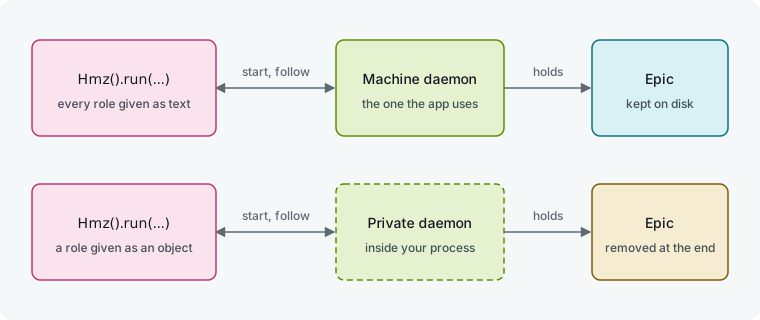
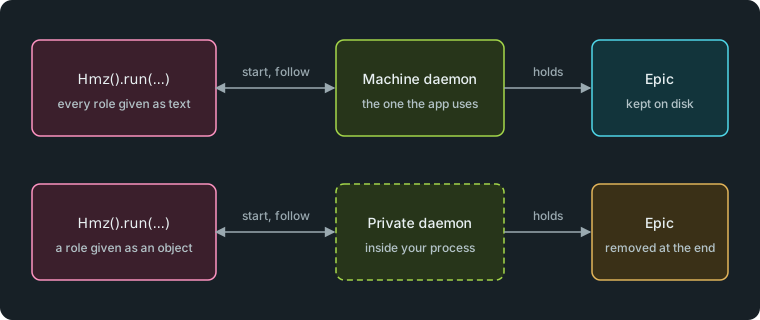
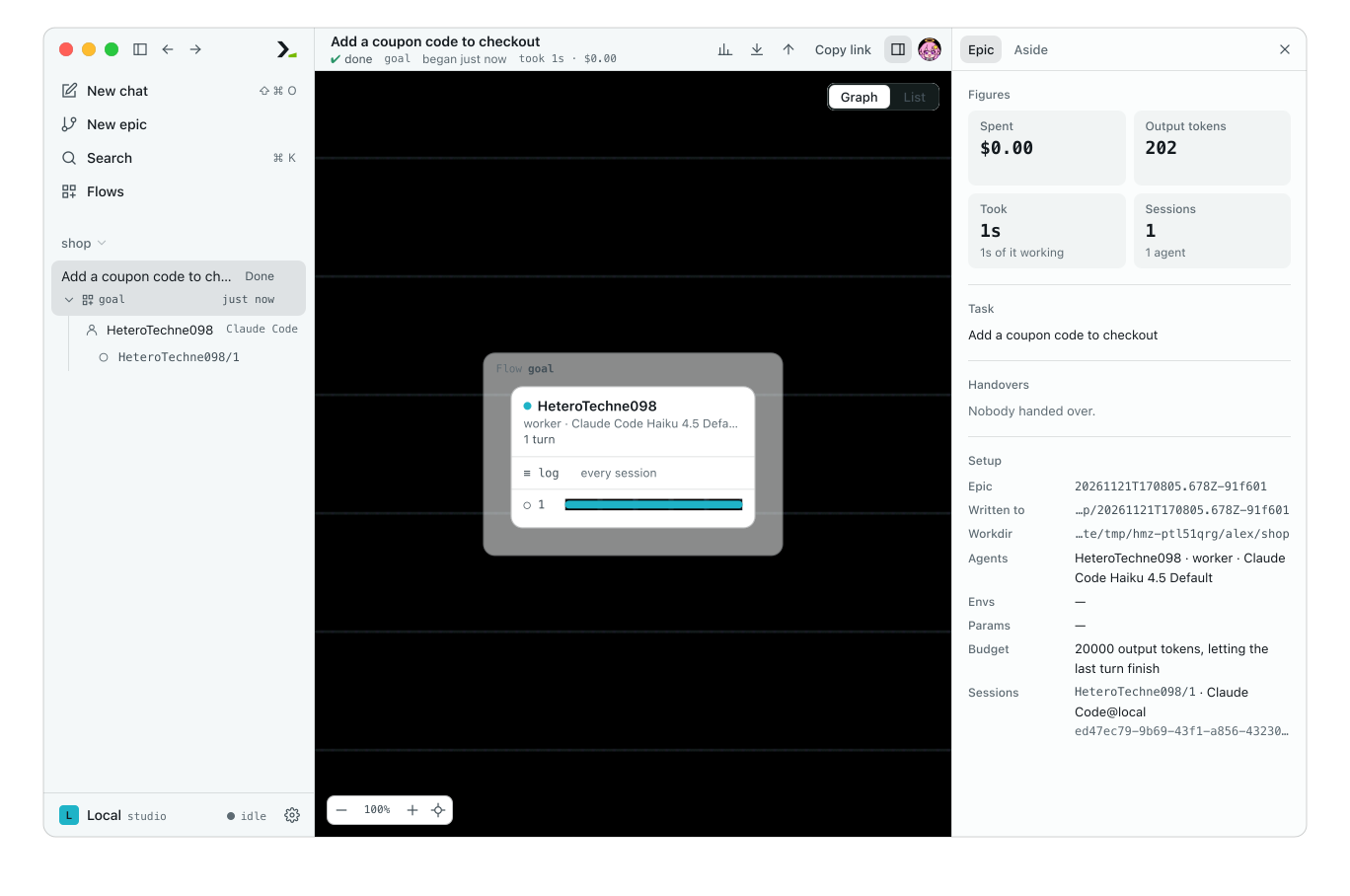
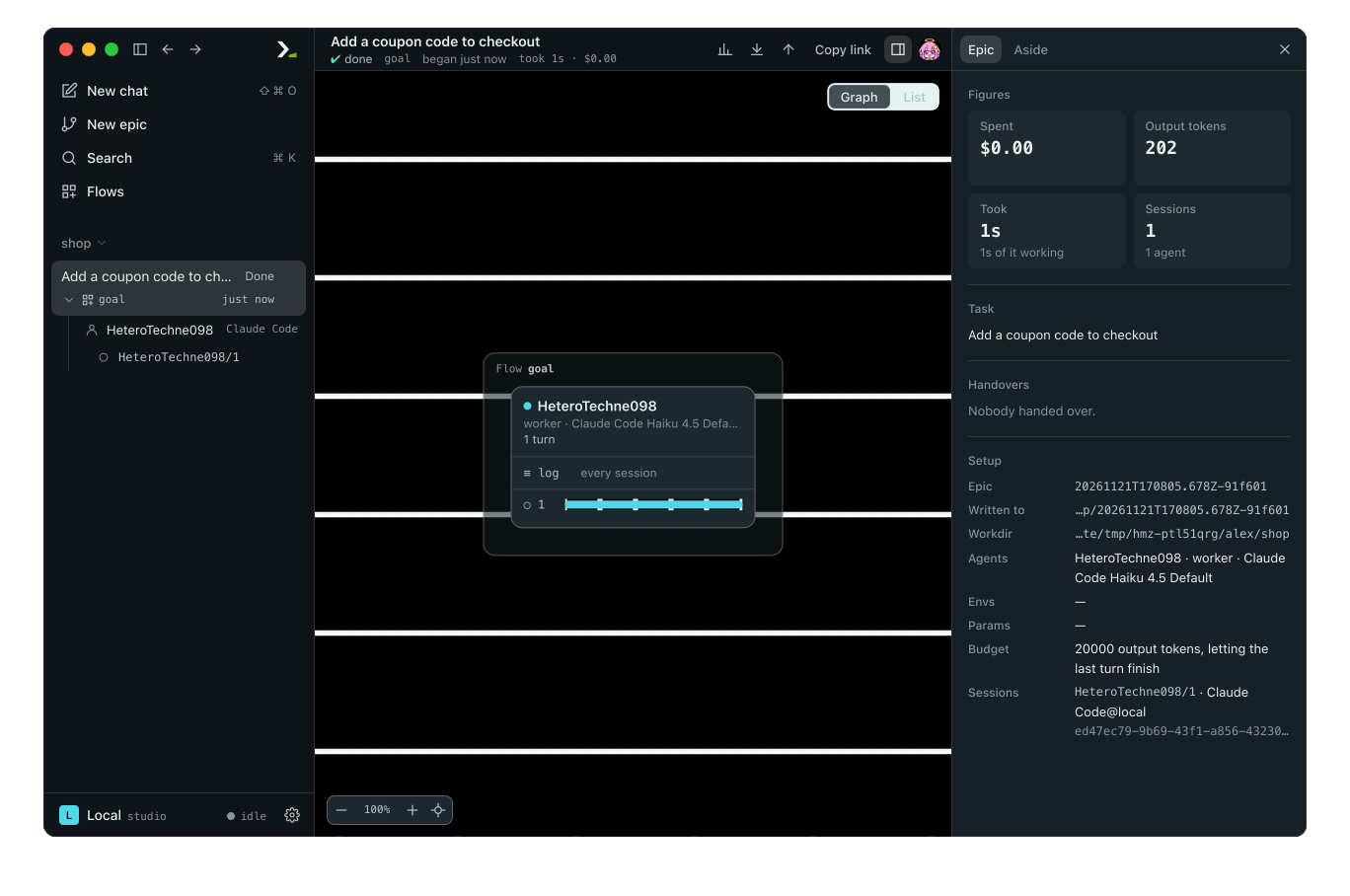
Your program starts and follows the epic. A daemon holds it.
Run a flow
from hmz.sdk import Hmz

hmz = Hmz()
result = hmz.run(
    "goal",
    "Add a coupon code to checkout",
    agents={"worker": "claude/claude-haiku-4-5"},
    budget={"output_tokens": 20000},
).run()
Create Hmz() to point at the current directory, or Hmz("/path/to/project") for another workspace. Creating it reads no files and starts nothing.
Call hmz.run(flow, task, ...) to have the machine's daemon check the epic, starting the daemon if needed. It returns an unstarted Run. Call .run() to start the epic, wait for it to finish, and get the flow's return value.
| Argument | What it takes |
|---|---|
flow | Flow name, path, or ref. |
task | Task description. |
agents | Mapping of agent roles to -a values (after <role>=) or driver objects. |
envs | Mapping of environment roles to -e values (after <role>=) or driver objects. |
params | Flow parameters as a mapping or model. Defaults to the flow's defaults. |
budget | Spending limit as a mapping or Budget. Required for every flow. |
resume | True to resume the newest resumable epic of this flow here, or an epic's directory to resume that one. |
outworlder | Object that answers the flow's questions. Defaults to nobody answering. |
backup | Names of backup targets for the epic. Defaults to the default targets. |
profile_flow | True to sample the flow's Python code while it runs. |
profile_environment | True to profile the programs the agents start. |
If the daemon refuses the epic, run(...) raises Refused with the message hmz exec prints, code, and data. If the daemon is unreachable, it raises OSError.
You can also check or run flows in three other ways:
hmz.runner(flow, ...)takes the same arguments excepttaskandoutworlder. It checks the epic and stores the daemon's response inchecked.hmz.exec(argv)runs anhmz execargument list and returns the flow's result.hmz.read(argv)parses the argument list without running it.
hmz.exec(
    ["-f", "goal", "-a", "worker=claude/claude-haiku-4-5",
     "-p", "budget.output_tokens=20000", "Add a coupon code to checkout"]
)
Follow and control a run
from hmz.sdk import Hmz

hmz = Hmz()
run = hmz.run(
    "goal",
    "Add a coupon code to checkout",
    agents={"worker": "claude/claude-haiku-4-5"},
    budget={"output_tokens": 20000},
)
run.opened(lambda role, session: print(f"[{role}] {session.cli} {session.model}"))
run.watch(lambda agent, key, event: print(f"  {event['kind']}: {event['text'][:60]}"))
run.start()
run.wait()
print("raised:", run.raised)
print("spent:", run.usage.output_tokens, "output tokens")
print("epic:", run.epic.name)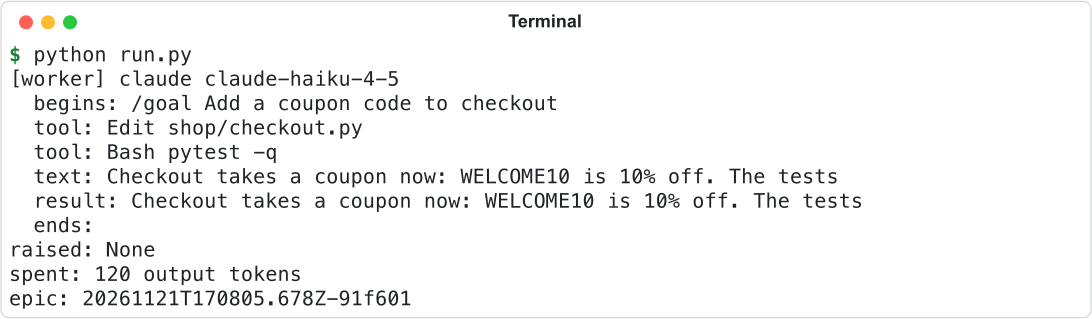
Register callbacks before calling start(). Humanize invokes them from another thread.
| Callback | What it receives |
|---|---|
run.watch(fn) | Every session event: agent name, session key, and event dictionary with kind and text. |
run.opened(fn) | Every opened session before its events: role, and an object with key, role, agent, cli, model, person, env, and harness. |
run.noticed(fn) | Every notice about the epic as text. |
run.printed(fn) | Every line printed during the epic as text. |
| Method | What it does |
|---|---|
run.run() | Starts the epic, waits, and returns the result or raises. |
run.start() | Starts the epic and returns immediately. A second call raises RuntimeError. |
run.wait(timeout=None) | Waits for the epic to end and returns whether it finished. |
run.stop() | Stops the epic without waiting. Safe from any thread. |
run.close() | Stops the epic, forces it if still stopping, and disconnects from the daemon. |
| Property | What it holds |
|---|---|
flow, ref, task | Flow name, canonical ref, and task. |
declaration | Declared roles and parameters. |
budget, usage | Allowed budget and current spending. |
backup, profile_flow, profile_environment | Start options. |
names | Agent name for each agent role. |
agents | Open sessions, oldest first. |
epic | Epic directory, once created. |
running | Whether the epic is between start() and completion. |
result, raised | Return value or exception, once ended. |
unreadable() | Budget limits that nothing in this epic can enforce, in words. |
run.run() responds to how the epic ended:
| The epic | run.run() |
|---|---|
| finished | returns the flow's return value |
| was stopped | raises asyncio.CancelledError |
| ran out of budget | raises hmz.flows.BudgetExceeded |
| was refused at the start | raises Refused with code 409 |
| failed, or its daemon went away | raises RuntimeError |
Because the daemon holds the epic, the epic appears in the app and continues even if your program exits.
Answer the person's questions
Pass an outworlder object to run(...) to answer questions from the flow's Outworlder roles.
from hmz.sdk import Ask, Hmz


class Reviewer:
    def away_for(self, role: str) -> bool:
        return False

    async def run(self, ask: Ask, role: str):
        print(f"[{role}] {ask.prompt}")
        if ask.schema is None:
            return "yes"
        return {"verdict": "approve"}


run = Hmz().run(
    "@local/sign_off",
    "Add a coupon code to checkout",
    agents={"coder": "claude/claude-haiku-4-5"},
    budget={"output_tokens": 20000},
    outworlder=Reviewer(),
)
run.run()
Here @local/sign_off is a project flow that asks for a verdict. away_for(role) returns whether the role is away. run(ask, role) receives a question and returns the answer as text, a mapping, or a Pydantic model.
Field of Ask | What it holds |
|---|---|
prompt | Question text. |
schema | JSON Schema for the answer, or None for plain text. |
context | Context blocks shown before the question, each as JSON. |
face | Hash of the question's face, or "". |
session | Asking session as <role>/<n>. |
errors | Validation errors from the previous attempt, each as {"path": [...], "message": ...}. |
model | Always None in an SDK run. |
- The daemon validates the answer against
schema. Invalid answers are re-asked witherrorspopulated, up to three tries total, before the role is treated as away for that question. - Returning
""or raising an exception also answers that question as an away role would. - Define
show(context, session, role)to receive context the flow displays without asking a question. - If you omit
outworlder, allOutworlderroles are away.
See The person as an agent for how flows ask questions.
Look up flows, accounts and nous
Use Hmz stores to read and write the settings shown in the app.
from hmz.sdk import Hmz

hmz = Hmz()
for offer in hmz.flows.all():
    print(f"{offer.name:16} {offer.about}")
print([role.name for role in hmz.flows.declared("goal").agents])

key = hmz.accounts.way("claude", "key")
hmz.accounts.make("claude", "work", key, {"ANTHROPIC_API_KEY": "not-a-real-key"})
hmz.nous.write(
    "careful", graph=["claude/claude-opus-4-1", "claude/claude-haiku-4-5"], tries=2
)
print([one.name for one in hmz.accounts.all("claude")])
print([one.name for one in hmz.nous.all()])| Store | What you can do |
|---|---|
hmz.flows | List available flows (all), find a file (find), read its summary (about), inspect roles and params (declared), check resumption support (resumes), copy into the project (fork), and list active flow calls in this process (running). |
hmz.verses | Manage flowverses (all, nearest, find, add, fetch, remove, index, holds, edited, standing, where, plain, whence) and installed flows (install, uninstall, installed, updates). |
hmz.accounts | List accounts (all, find, where), inspect sign-in methods and requirements (ways, way, wants, asks), create or update accounts (make, write, sign_in, remove), copy to compatible coding agents (serves, copies), inspect turn environment (env, environ), and read or refresh models (models, asked, stale, ask). |
hmz.nous | Read nous definitions (all, rule, reads, entry, spec), write them (write, put, retrying, then, renamed, clear), validate without writing (check, checked, graph, shown), and list wait policies, balance strategies, and fault classes (default, policies, named, strategies, strategy, faults). |
hmz.runtimes | List runtimes (kinds, all, find, saved), create or update them (new, add, write, remove), import SSH hosts (hosts, import_ssh, resolve), and test them (check). |
hmz.settings | Access workspace and global settings. hmz.workspace and hmz.home hold the project directory and Humanize home. |
hmz.backends() | List supported coding agents. hmz.installed() lists installed ones with models, hmz.installable() lists those missing an extra, and hmz.adding(backend) returns the install command. hmz.serves(backend, role) checks role compatibility, and hmz.ready_to_open(backend) checks whether it can be picked as the default agent without setup. |
hmz.reports() | Starts error reporting if consented, and returns whether reporting is active. |
hmz.carried(pages) | Returns the daemon calls that copy this machine's settings pages to another daemon. |
See Publish and version a flow, Accounts, and Nous for details.
Read epics back
from hmz.sdk import Hmz

epics = Hmz().epics
for path in epics.all():
    ran = epics.read(path)
    print(ran.began[:19], ran.flow, epics.ending(ran), ran.task)

last = epics.all()[-1]
for session in epics.transcripts(last):
    for action in session["actions"]:
        print(" ", action["category"], action["name"][:56])
where, trace = epics.traced(last)
print("trace:", where.name, trace["otherData"]["slices"], "slices")
archive, manifest = epics.bundled(last, output=".")
print("archive:", archive.name)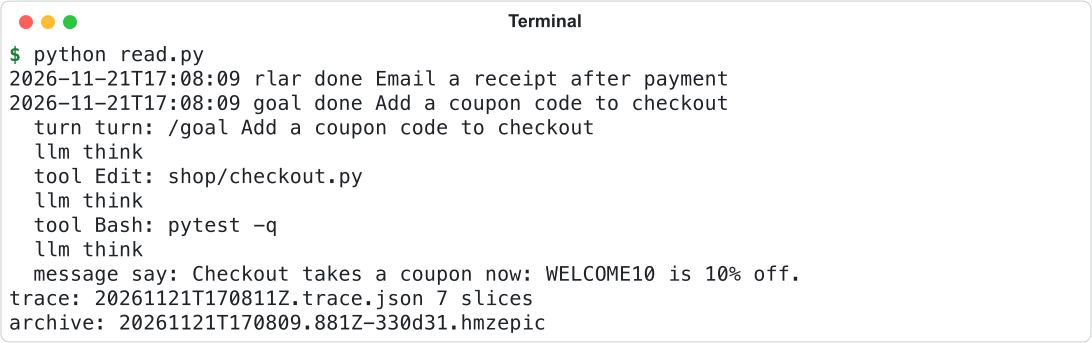
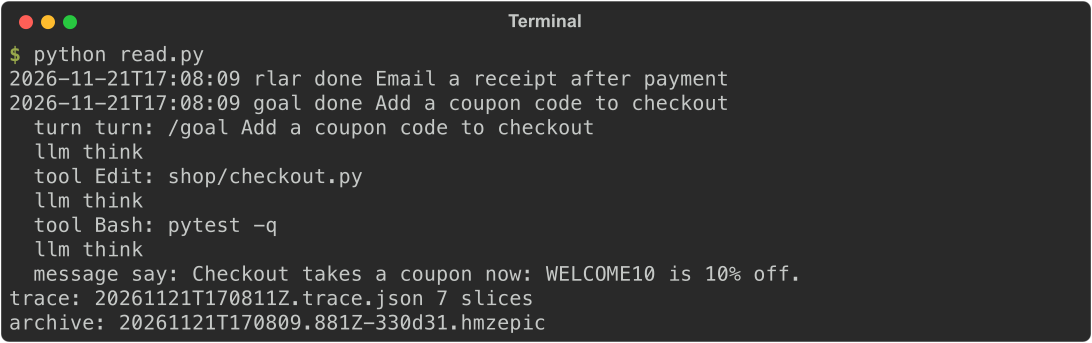
Use hmz.epics to inspect epics by their directory path:
| Method | What it returns |
|---|---|
all(), every() | Epics in this workspace or across the machine, oldest first. under() returns their parent directory. |
read(epic) | Epic record: flow, task, timestamps, ending, agents, sessions, params, budget, usage, and backups. |
ending(ran), going(epic) | Outcome (running if active), and whether the epic is still running. |
tree(epic), sessions(epic), opened(epic) | Called flows, sessions, and agent session IDs. |
resumed(flow), picks_up(epic), foreign(epic), state(epic, flow="") | Newest resumable epic for a flow, whether an epic can resume, why an imported epic cannot, and saved state. |
transcripts(epic) | Everything each session said and did. Reads all logs, so it is slow. |
timeline(epic) | Trace data for the app's Exomyth view, without writing files. |
traced(epic, output=None, start=None, end=None) | Writes a Chrome trace (into traces/ by default) and returns its path and content. |
trace(sessions=..., ...) | Builds a Chrome trace for specific sessions, with or without an epic. |
bundled(epic, output=...) | Writes a redacted .hmzepic archive and returns its path and manifest. |
imported(archive) | Imports a .hmzepic archive and returns the new epic directory. |
chats(), chat(name) | All chats in this workspace, or one by name. |
Use hmz.backups to manage git backup repositories:
| Method | What it does |
|---|---|
targets(), defaults() | Lists configured backup targets and default target names. |
push(epic, names=None) | Queues an epic backup and returns immediately. wait(seconds=None) waits for queued backups. |
state(epic), where(epic) | Returns the status of the last backup per target, and the epic's path in a target repository. |
listed(name), pulled(name, key) | Lists epics in a target repository, and downloads one to this machine. |
See Trace a run, Export and import, and Backups.
Talk to the daemon yourself
Use Client to call daemon methods directly, Daemons to find hosts running a workspace's epics, and Link to attach to a host like the app does.
from pathlib import Path

from hmz.sdk import Client, Daemons

with Client.local(name="ci") as client:
    print("protocol", client.protocol, "as", client.device)
    listed = client.call("runs.list", {"workspace": str(Path.cwd())})
    for one in listed["runs"]:
        print(one["name"], one["flow"], one["how"])

with Daemons().host().link(name="ci", replay=False) as link:
    link.start(
        "goal",
        "Add a coupon code to checkout",
        agents={"worker": "claude/claude-haiku-4-5"},
        budget={"output_tokens": 20000},
    )
    for said in link:
        if said["type"] == "event":
            print(said["kind"], said["text"][:50])
        if said["type"] == "ended":
            print("ended:", said["how"])
            break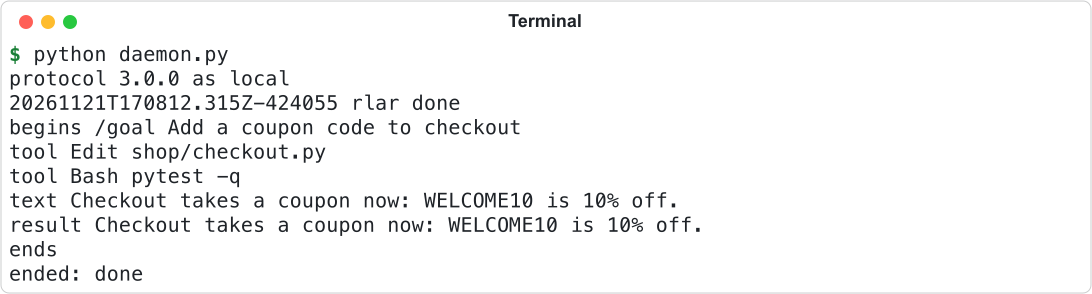
| Object | What it offers |
|---|---|
Client.local(name="", kind="sdk") | Opens a session with the local daemon, starting it if needed. Raises OSError if unreachable. |
client.call(method, params, idem=None, seconds=None) | Sends one request. Raises Refused (with message, code, and data) or TimeoutError. |
client.heard(fn) | Calls fn(method, params) on each notification. client.wait() waits for the session to close; client.close() closes it. |
client.daemon_id, version, protocol, capabilities, device | Daemon metadata. |
Daemons().here(workspace=None) | Returns the host holding the workspace's runs, or None. all() lists local hosts; host(workspace=None) starts one if needed. |
| A host | link(name="", kind="sdk", replay=True) attaches a frontend. status() returns running epics, detach() disconnects frontends, stop() closes runs, kill() terminates the process, and alive checks if it is running. |
| A link | Iterate over it or pass a callback to heard(fn) to receive messages. Sends start, say, answer, stop, force, afk, claim, release, board, chat calls (chat, chat_say, chat_stop, chat_commands, chat_set, chat_move), aside, and arbitrary requests via asked. |
Manage remote daemons with hmz.daemons: all, find, write, remove, offered, imported, and remotes(), which provides connect(name), state(name), pair(name, code) to add a daemon from a pairing code, client(name) to obtain a Client, and close().
Reaching a daemon over SSH replaces another release of hmz on its machine unasked, unless that release holds running epics. On a machine that has no hmz, the SDK installs nothing and the daemon is failed with hmz is not installed on <name>., because nobody is there to ask. Pass remotes(install=True) to install it unasked. With remotes(install=None) the daemon is asking until you call answer(name, True) or answer(name, False); while it is asking, client(name) raises Unreached at once. A yes holds until the returned object is closed or the daemon's routes change. After a no, the daemon stays failed until the next connect(name).
See Daemon and wire for methods and Events and records for message formats.
Run on objects of your own
Pass a custom object—such as a scripted agent or an in-memory filesystem—to a role instead of a string. Because the machine's daemon cannot hold Python objects from your process, the SDK runs a private in-process daemon for that epic.
from hmz.sdk import Hmz, fakes

worker = fakes.FakeAgentDriver(reply="Added WELCOME10.")
run = Hmz().run(
    "tidy", "Add a coupon code to checkout", agents={"worker": worker}, budget={"cost": 1}
)
print(run.run())
print(worker.sessions[0].prompts)
Here tidy is a project flow with one worker role. run.run() returns the exact object the flow returned, or raises the exact exception it raised. See Test a flow for hmz.sdk.fakes and run_fake.
Good to know
- A private daemon uses a temporary home containing only a copy of your settings file. Flows installed from a flowverse are unavailable there, so pass a project flow or a path. When the run finishes, the epic is deleted and nothing outlives your process.
- Flows referenced with
git+are fetched and checked only when the epic starts, so a refusal surfaces once the run is started (fromstart()orrun.run()) rather than fromhmz.run(...). - If the daemon connection drops,
Runreconnects automatically. - After an epic finishes,
Runstays attached for up to 60 seconds while backups complete. - See SDK for all public names and signatures.