Tools the agent can call
Fake tools and fake command lines let an agent call back into your flow. When the agent invokes the tool or runs the program, a Python function in your flow answers.
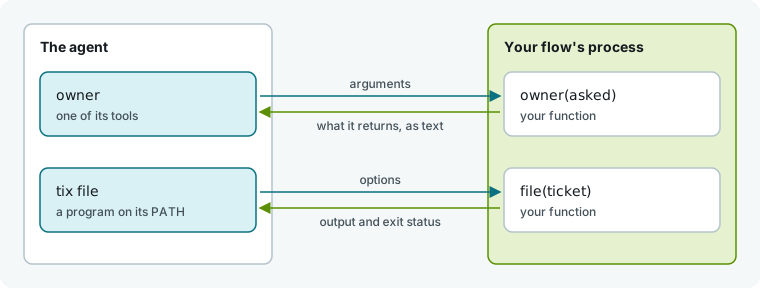
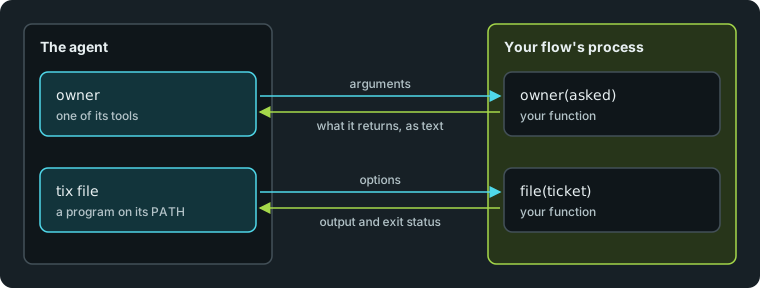
Use a FakeTool when the agent should call something by name with typed arguments. Use a FakeCli when a shell program is more natural, or when the harness does not serve tools.
Declare a tool and a command line
Declare tools and command lines on the agent role. Save this flow as .hmz/flows/triage/__init__.py to give its triager an owner tool and a tix program:
import pydantic

from hmz.flows import (
    Agent,
    AgentCollection,
    EnvCollection,
    FakeCli,
    FakeCommand,
    FakeTool,
    FakeToolAgentMixin,
    FlowContext,
    FlowParams,
    LocalEnv,
    flow,
)

OWNERS = {"shop/checkout.py": "payments", "shop/cart.py": "storefront"}


class File(pydantic.BaseModel):
    path: str = pydantic.Field(description="A file of this repository.")


def owner(asked: File) -> str:
    return OWNERS.get(asked.path, "nobody")


tickets: list[str] = []


class Ticket(pydantic.BaseModel):
    title: str = pydantic.Field(description="What the ticket says.")
    urgent: bool = pydantic.Field(False, description="Whether it jumps the queue.")


def file(ticket: Ticket) -> str:
    tickets.append(("urgent: " if ticket.urgent else "") + ticket.title)
    return f"filed #{len(tickets)}"


def listed() -> list[str]:
    return tickets


class Triager(Agent, FakeToolAgentMixin):
    _tools = (
        FakeTool("owner", "Says which team owns a file of this repository.", owner, File),
    )
    _clis = (
        FakeCli(
            "tix",
            "Files and lists the tickets of this run.",
            (
                FakeCommand("file", "Files a ticket.", file, Ticket),
                FakeCommand("list", "Lists the tickets filed so far.", listed),
            ),
        ),
    )


class Agents(AgentCollection):
    triager: Triager


class Envs(EnvCollection):
    workspace: LocalEnv


@flow(agents=Agents, envs=Envs, params=FlowParams)
async def triage(
    task: str, *, agents: Agents, envs: Envs, params: FlowParams, ctx: FlowContext
) -> list[str]:
    """Find what is wrong and file a ticket for the team that owns it."""
    triager = agents["triager"]
    tickets.clear()
    prompt = (
        f"{task}\n\nCall the `owner` tool to find the team that owns a file. "
        "File each problem with `tix file`; `tix --help` says how."
    )
    await triager.run(prompt, session=await triager.spawn(), env=envs["workspace"])
    return list(tickets)
Set _tools to a tuple of FakeTool and inherit FakeToolAgentMixin. Set _clis to a tuple of FakeCli; it needs no mixin. Tell the agent in the prompt that the tool and program exist, and it decides when to call them.
Run the flow:
hmz exec -f @local/triage -a triager=claude/claude-haiku-4-5 \
    -p budget.output_tokens=20000 "The build is red: find out why"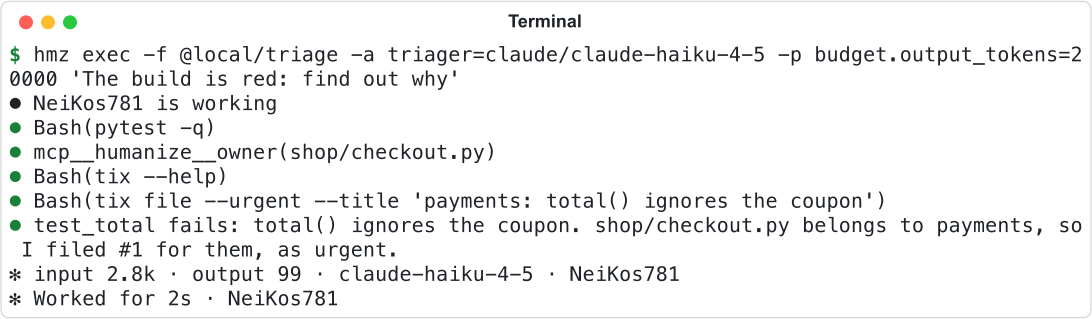
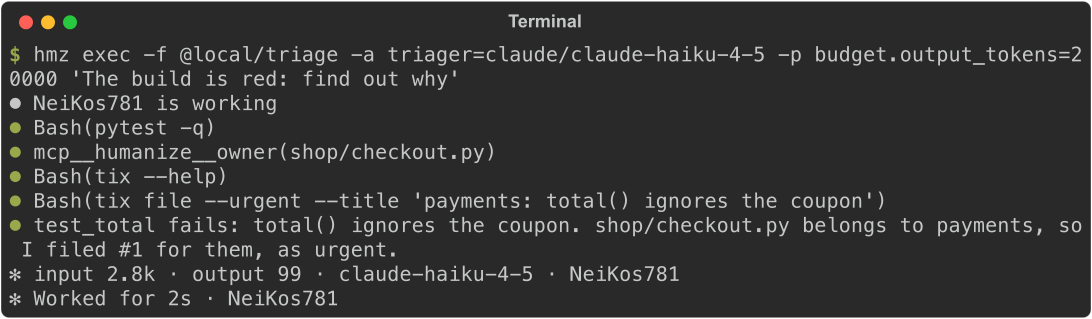
Claude Code names the tool mcp__humanize__owner. tix is a Bash command.
Open the agent's session in the app to see each call and the flow's reply.
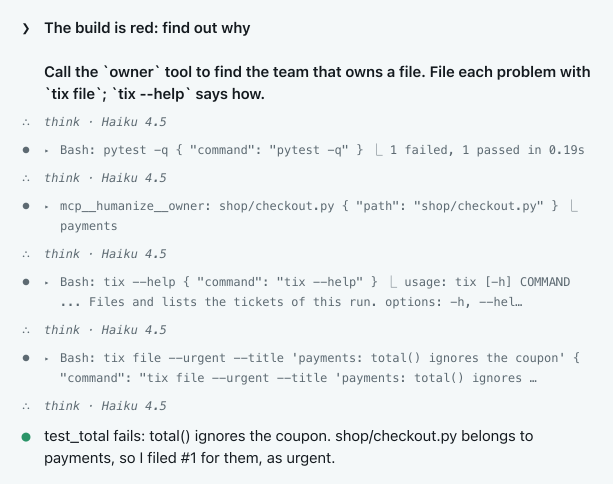
payments and the usage text came from the flow's functions.
Write a tool
FakeTool(name, about, call, takes) takes four arguments; takes is optional:
| Field | Meaning |
|---|---|
name | Tool name. Each name is used once per role. |
about | One-sentence description. This is all the model sees about when to use the tool. |
call | Your function (def or async def). It receives an instance of takes, or no arguments when takes is None. |
takes | A pydantic model for the arguments, or None. The agent receives its JSON Schema: fields, types, required flags, and each description. |
The function runs on the flow's event loop while the agent's turn waits. It can do anything the flow can: read a file, run another agent, or call another flow.
The return value determines what the agent reads:
| The function | The agent reads |
|---|---|
returns a str | the string |
returns None | done |
| returns anything else | the value as JSON |
| raises | that the tool failed, with the error. The turn and the flow continue. |
Write a command line
FakeCli(name, about, commands) puts a program on the agent's PATH. Each FakeCommand(name, about, call, takes) defines one subcommand. The agent inspects it with --help:
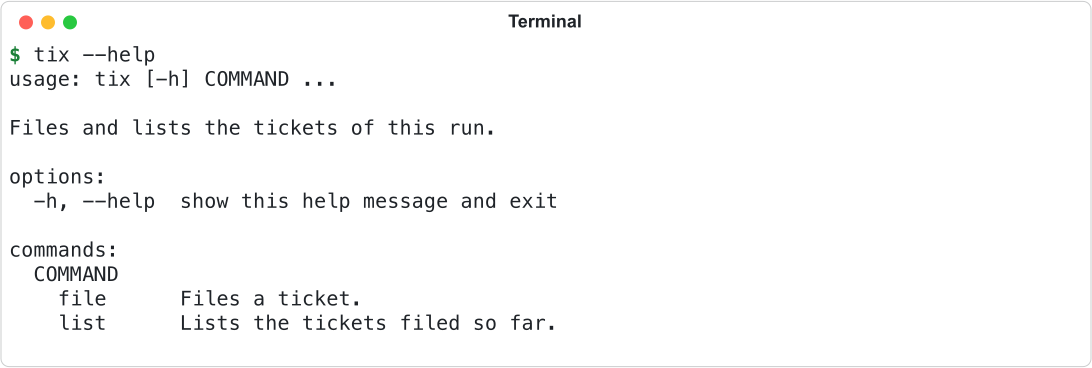
Humanize generates the help text from the Ticket model.
Each field of a command's takes model becomes a flag:
| Field in the model | Option |
|---|---|
| any field | --name; max_items becomes --max-items. Its description is the help text. |
| no default | required |
| a default | optional; the help shows the default |
bool | --urgent and --no-urgent |
list[...] | several words: --labels a b |
Literal or an Enum | one of its values |
The model validates the input, so passing --max-items abc to an int field returns a usage error.
The program exits like a standard CLI:
| What happens | Output | Exit status |
|---|---|---|
--help | the help | 0 |
| unknown command, missing or invalid option | usage and the error, on stderr | 2 |
the function returns a str | the string | 0 |
the function returns None | nothing | 0 |
| the function returns anything else | the value as JSON | 0 |
the function raises SystemExit(n) | nothing | n (a string instead of a number is printed on stderr, with status 1) |
| the function raises anything else | the error, on stderr | 1 |
Non-zero exits do not fail the turn. The agent reads the output and exit status and continues.
FakeCli(...) raises ValueError if the name is empty, starts with . or -, or contains characters other than letters, digits, ., _, and -. It also raises if you pass no commands or if two commands share a name.
Check which harnesses work
Fake command lines work on every harness except litellm, which has no shell. Fake tools require a harness that supports FakeToolAgentMixin:
Harness (-a) | |
|---|---|
| Fake tools | claude, codex, opencode, mimo, qwen, grok, pi, omp, agy, dsh |
| No fake tools | cursor-agent, mcode, kimi, litellm, acp |
Humanize rejects an unsupported harness before the first turn. See Agent roles for mixins and the capability table.
Test without an agent
Call tools and programs from a scripted agent through its FakeSession. Call session.use(name, arguments) to get the text the agent would read. Call session.run_cli(argv) to get (status, stdout, stderr).
# tests/test_triage.py
from hmz.sdk import fakes


async def files_one(prompt: str, *, session: fakes.FakeSession, **_: object) -> str:
    team = await session.use("owner", {"path": "shop/checkout.py"})
    status, out, err = await session.run_cli(
        ["tix", "file", "--title", f"{team}: total() ignores the coupon"]
    )
    return out


async def test_the_ticket_names_the_owner() -> None:
    triager = fakes.FakeAgentDriver(reply=files_one)

    filed = await fakes.run_fake("triage", "the build is red", agents={"triager": triager})

    assert filed == ["payments: total() ignores the coupon"]
To test a CLI outside a flow, call FakeCli.run(argv) with the arguments after the program name. It returns (status, stdout, stderr), and its command functions must be synchronous def functions.
Call FakeTool.schema() to inspect the JSON Schema given to the agent. See Test a flow for more on scripted agents.
Good to know
- Every session of a role gets its tools and programs, and an agent created with
derivekeeps them. When you pass the agent to a subflow, the subflow's role definition replaces them. - Tool and command functions live at module scope, so state like
ticketspersists across runs in the same process. Clear module state at the start of the flow. - Declaring
_toolswithoutFakeToolAgentMixin, or reusing a tool or program name on the same role, raisesFlowDefinitionErrorwhen the flow loads. - Fake tools require the harness to run on the same machine as the flow, except on
omp. Opening a session on a remote harness raisesUnsupportedOperation. Fake command lines have no such limit. - On
grok, a role with fake tools cannot run a turn with anoutput_schema, the first turn of a fork, a turn with the network off, or a turn that cannot write to the workdir. Each raisesHarnessUnrecoverable. - To answer free-form questions the agent asks the user, use the
on_ask_userhook instead of a fake tool. See Hooks.