Skills and permissions
Set _skills and _permission on a role class to give its sessions skills and control what they may touch. Every session of the role gets those skills and runs inside that permission fence.
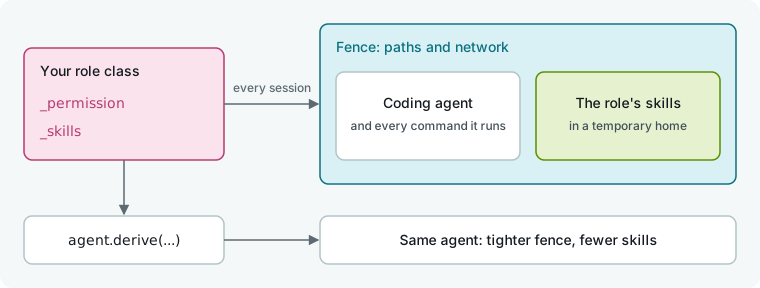
Declare skills and permissions on a role
In this flow, the coder can edit the project except vendor/ and stays offline, while the reviewer is read-only and carries a flow skill.
# .hmz/flows/guarded/__init__.py
from hmz.flows import (
    Agent,
    AgentCollection,
    EnvCollection,
    FlowContext,
    FlowParams,
    LocalEnv,
    Permission,
    deny,
    flow,
    read_only,
)


class Coder(Agent):
    """Changes the project, but not what is vendored in it."""

    _permission = Permission(
        preset="workspace-write",
        network=False,
        granular=(read_only("./vendor"), deny("~/.ssh")),
    )


class Reviewer(Agent):
    """Reads the change by the house style and changes nothing."""

    _permission = Permission(preset="read-only")
    _skills = ("house-style",)


class Agents(AgentCollection):
    coder: Coder
    reviewer: Reviewer


class Envs(EnvCollection):
    workspace: LocalEnv


@flow(agents=Agents, envs=Envs, params=FlowParams)
async def guarded(
    task: str, *, agents: Agents, envs: Envs, params: FlowParams, ctx: FlowContext
) -> str:
    """A fenced coder does the task; a read-only reviewer checks it."""
    coder, reviewer = agents["coder"], agents["reviewer"]
    workspace = envs["workspace"]
    await coder.run(task, session=await coder.spawn(), env=workspace)
    return await reviewer.run(
        "Review the change with the house-style skill.",
        session=await reviewer.spawn(),
        env=workspace,
    )
Place the skill directory beside the flow's code:
.hmz/flows/guarded/
├── __init__.py
└── skills/
    └── house-style/
└── SKILL.md---
name: house-style
description: Review a change against this team's house style.
---
Check that every public function has a docstring and a test, and that no price is a float.Run the flow:
hmz exec -f @local/guarded -a coder=claude/claude-haiku-4-5 \
    -a reviewer=claude/claude-haiku-4-5 -p budget.output_tokens=20000 \
    "Add a discount code to checkout"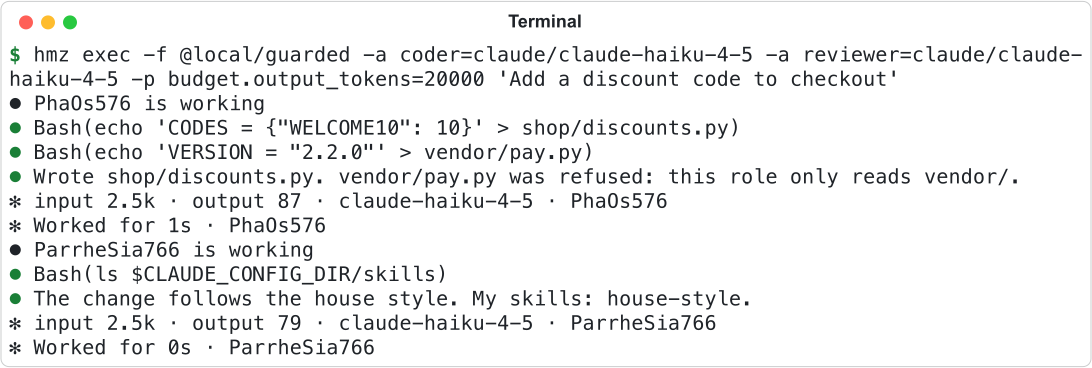
The coder's write to vendor/ is refused. The reviewer finds house-style in its skills folder.
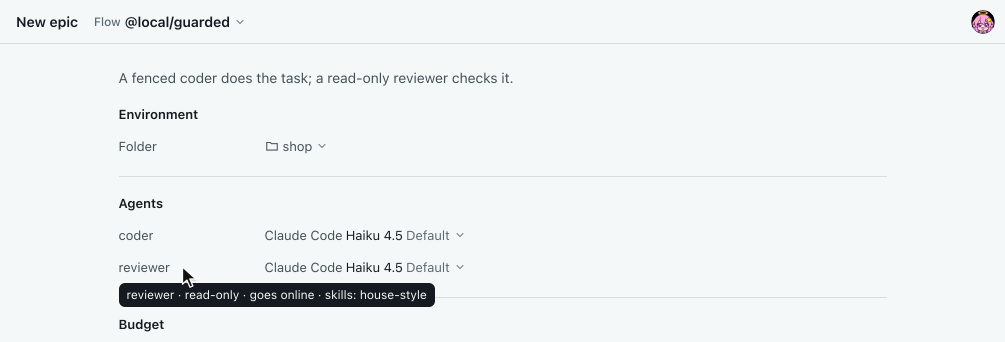
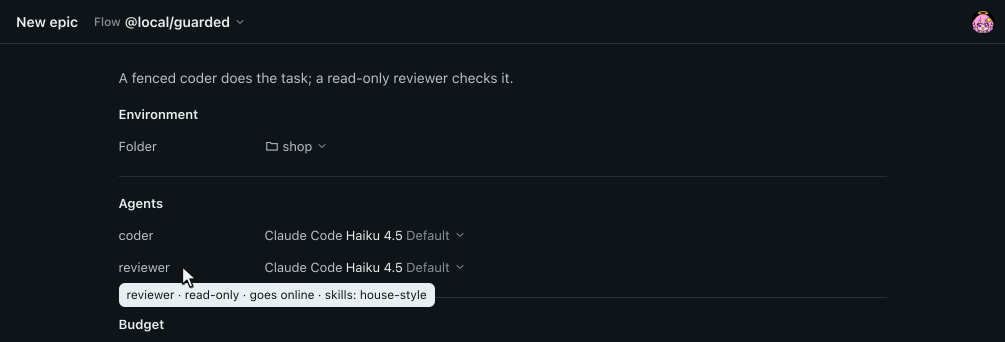
The person who runs the flow picks the agent for each role, but cannot change the role's permissions or skills. Point at a role's name on the New epic page to see its grants.
Bundle skills with a flow
Write each skill as a directory containing SKILL.md. Set _skills on the role to a tuple of skill names or git URLs:
| Entry | What the role gets |
|---|---|
"house-style" | The skill in the flow's own skills/house-style/ |
"https://github.com/humanfia/flowverse#deep-research" | The single skill skills/deep-research in that git repository |
"https://github.com/humanfia/flowverse" | Every skill under that repository's skills/ |
An entry with # or :// is read as a git URL. A role without _skills gets none of the flow's skills.
hmz resolves a role's skills once per epic, before the role's first turn. If a skill is missing from the flow's skills/, a repository cannot be fetched, or a #<skill> is not in the repository, hmz raises FlowDefinitionError and nothing runs.


For installed flows, installing fetches every skill a role names by a URL written as a string literal into the flow's skills/, so runs need no network for skills. For uninstalled flows (in .hmz/flows/ or from a git ref), hmz fetches URLs into a local cache when a run needs them. If the flow's skills/ and a repository have a skill with the same name, the role gets the flow's copy.
Each session receives its skills in a temporary home directory alongside the user's own skills; opencode and mimo are pointed at the flow's skills through their configuration instead. Nothing is written to the workspace or the user's skills folders. Where names clash, a flow skill replaces the user's skill of that name, and a skill in the workspace replaces both. See Skills.
Set file and network permissions
Pass preset, network and granular to Permission:
| Field | Values | Default |
|---|---|---|
preset | "read-only", "workspace-write", "danger-full-access" | "workspace-write" |
network | True or False | True |
granular | a tuple of rules laid over the preset | () |
A role without _permission gets Permission(): the agent can write to its workdir, read the rest of the machine, and use the network.
Each preset expands to base rules:
| Preset | Rules |
|---|---|
read-only | read_only("/") |
workspace-write | read_only("/"), allow(".") |
danger-full-access | allow("/") |
Build granular rules with three functions. Each rule covers the path and everything under it:
| Rule | Access | The agent may |
|---|---|---|
allow(path) | Access.WRITE | read and write |
read_only(path) | Access.READ | read, not write |
deny(path) | Access.NONE | neither |
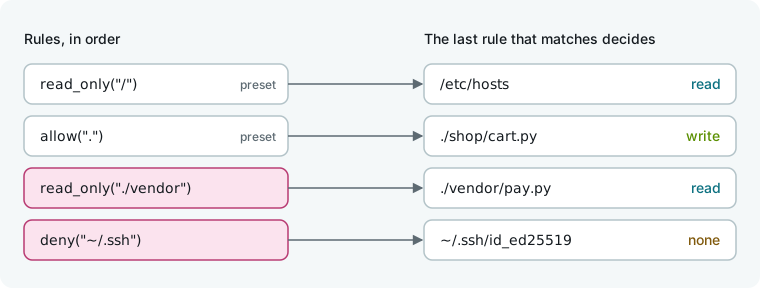
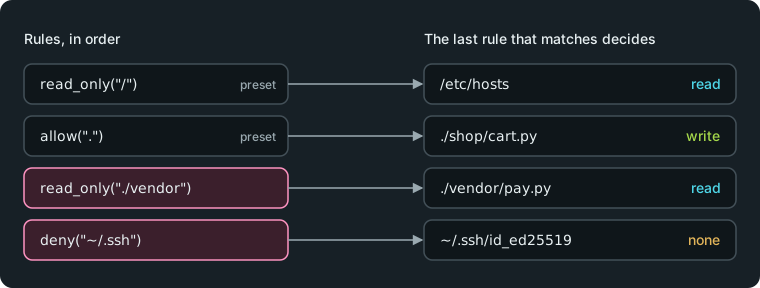
Preset rules run first, followed by granular rules in order. For any path, the last matching rule wins. Put wider rules before narrower ones: (deny("./vendor"), allow("./vendor/ours")) lets the agent write ./vendor/ours, while the reverse denies it.
Start every rule path with one of three anchors, which resolve when a session opens:
| Path starts with | Means |
|---|---|
/ | An absolute path |
~ | The home directory of the user the coding agent runs as |
. | The workdir of the environment the turn works in |
A path without an anchor, with .., or with a glob (*, ?, [) raises ValueError when the rule is created.
network is separate from the rules. network=False blocks network access, including the agent's built-in web search and fetch, even under danger-full-access. The agent can still reach its model.
Inspect a Permission object to check what it grants:
held = Coder._permission
held.rules                         # the preset's rules, then granular
held.access("./vendor/pay.py")     # Access.READ
held.covers(Permission(preset="read-only", network=False))  # False: it could read ~/.ssh
access(path) returns the Access level for a path (Access.NONE < Access.READ < Access.WRITE). covers(other) returns true when this permission grants at least what other grants across all paths and the network.
See Permissions and The sandbox for how limits are enforced.
Narrow an agent for one job
Call derive to create a copy of an agent with a narrower grant. The original agent is unchanged.
scout = coder.derive(
    permission=Permission(
        preset="read-only", network=False, granular=(deny("~/.ssh"),)
    )
)
plain = reviewer.derive(skills=())

await scout.run("List what checkout imports.", session=await scout.spawn(), env=workspace)| Argument | Meaning | Left out |
|---|---|---|
permission | What the derived agent may touch | The agent's own |
skills | Which of the agent's _skills entries it keeps, written as the role wrote them | All of them |
derive only narrows. Passing a permission that the agent's own permission does not cover, or a skill it was not granted, raises CapabilityNotGranted.
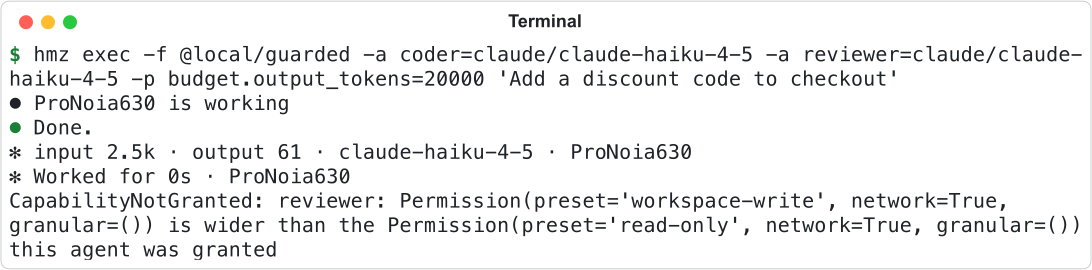
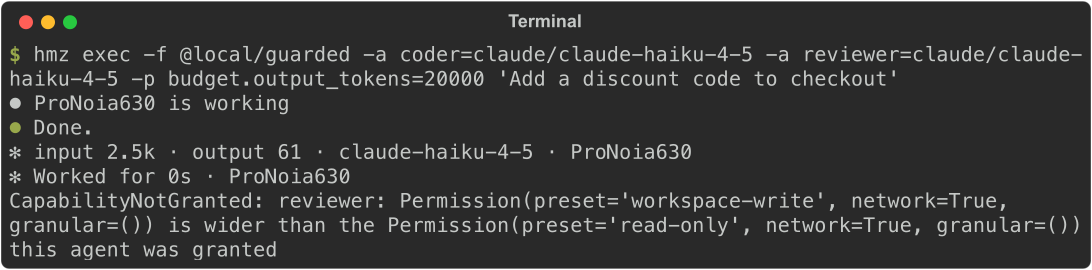
The flow asked for workspace-write on a read-only reviewer.
A derived agent shares the original's sessions, hooks, tools and command lines. Because a session always runs under the grant of the agent that spawned it, spawn the session from the derived agent.
Test role permissions and skills
A scripted agent records the permission and skills of each session it opened.
# tests/test_guarded.py
from hmz.flows import Access, Permission
from hmz.sdk import fakes


async def test_each_role_is_held_to_its_own() -> None:
    coder, reviewer = fakes.FakeAgentDriver(), fakes.FakeAgentDriver()

    await fakes.run_fake(
        "guarded", "add a coupon", agents={"coder": coder, "reviewer": reviewer}
    )

    held = coder.sessions[0].permission
    assert held.network is False
    assert held.access("./vendor/pay.py") is Access.READ
    assert held.access("./shop/cart.py") is Access.WRITE
    assert reviewer.sessions[0].permission == Permission(preset="read-only")
    assert [skill.name for skill in reviewer.sessions[0].skills] == ["house-style"]
    assert coder.sessions[0].skills == ()
Fakes record the permission without enforcing it. See Test a flow.
Good to know
- Agents run with approvals bypassed and never ask before acting. Permissions and hooks are the only limits. Add
PermissionRequestHookAgentMixinto a role to let your flow decide each tool request. - hmz never runs a session wider than its permission. If neither the coding agent nor the machine can enforce the permission, opening the session raises
HarnessSandboxed. - A role with workdir write access can also write
/tmp,/var/tmpand$TMPDIR.deny("/tmp")does not remove this access, thoughdeny("/tmp/x")blocks/tmp/x. - Coding agents always keep access to their own state, sign-in and temporary files, regardless of rules.
cursor-agentandmcodecannot fill a role withnetwork=Falsebecause their web search runs on vendor servers: opening the session raisesHarnessSandboxed. So does a custom CLI that declares nohosts(see Gateways, LiteLLM and custom CLIs).dsh,litellmand custom CLIs ignore skills. Roles filled by them run without the flow's skills.- A single-file flow (
.hmz/flows/name.py) has noskills/folder. Convert it to a directory to bundle skills. - A human (
Outworlder) has no skills. Callingderivewith a non-emptyskillson anOutworlderraisesCapabilityNotGranted. - When calling a subflow, the agent you pass must hold at least the permission the callee's role declares, or the call raises
PermissionTooNarrow. See Call another flow. - Copying a flow into a project copies its skills too. See Publish and version a flow.
- See the Flow API reference for full signatures.