Publish and version a flow
Publish a flow by adding a flow.yaml manifest for each release to a flowverse index. Users who add the flowverse can then install, update, and run the flow by name.
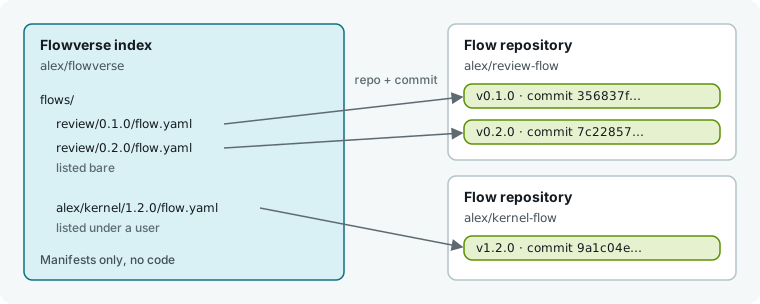
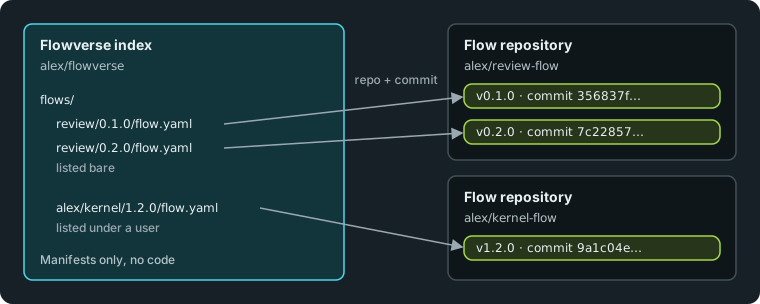
A flowverse is a git repository that holds manifests, not code. Each flow.yaml points to the repository and commit of one release. For a full walkthrough, see Publish a flow to a flowverse.
Lay out the flow's repository
Put your flow in a directory of the same name, with an __init__.py inside. Name the flow function after the directory.
review-flow/
├── review/              installed
│   ├── __init__.py
│   └── skills/
├── tests/               not installed
└── README.md
Humanize installs only the flow's directory and its contents, so keep any files the flow imports inside that directory. A single-file flow like review.py also works and installs into its own directory. When a role references skills by a git URL, Humanize fetches them at install time; see Skills and permissions.
Write a manifest
Write one flow.yaml manifest for each release:
name: review
version: 0.2.0
description: Review the current diff and write the findings to REVIEW.md.
repo: alex/review-flow
ref: v0.2.0
commit: 7c2285711cae4b1f0c9e2d7a83f5c6e0b9a1d2c3
subdir: review
license: MIT
dependencies:
lint: ">=1.0.0,<2.0.0"| Key | Required | Meaning |
|---|---|---|
name | yes | Flow name. Lower-case letters, digits, and _, starting with a letter. Must match the flow's directory in the index. |
version | yes | Release version as SemVer. Must match the version's directory in the index. |
repo | yes | Source repository: owner/repo on GitHub, or a URL starting with https://, http://, ssh://, git://, or file://. |
commit | yes | Full 40-digit hexadecimal commit hash to install. |
description | no | One-line summary shown beside the flow. |
ref | no | Release tag or branch. Shown to readers, never used for installation. |
subdir | no | Repository directory holding the flow. Omit if the flow is at the root. |
license | no | SPDX license identifier. |
dependencies | no | Other flows in the same flowverse that this flow requires, mapped to version ranges. |
Humanize ignores unknown keys.
Add the manifest to an index
Place the manifest in the index repository under one of two paths:
| Path in the index | Name once installed from a flowverse added as team | Name once installed from official |
|---|---|---|
flows/<flow>/<version>/flow.yaml | @team/review | review |
flows/<user>/<flow>/<version>/flow.yaml | @team/alex/kernel | alex/kernel |
<user> is a lower-case GitHub username or organization, and any GitHub repository under flows/<user>/ must belong to that owner. A directory under flows/ can hold either versions or users, never both. Nothing can be listed under humanfia.
To publish to your own flowverse, commit the manifest and push the index. Users can then add your flowverse by URL; see Find and install flows.
To publish to the official flowverse, open a pull request to humanfia/flowverse adding your manifest under flows/<your-github-user>/. Only humanfia flows are listed bare there.
Publish a new version
- Commit your changes in the flow's repository and tag the release, such as
v0.3.0. - Add a new manifest at
flows/review/0.3.0/flow.yamlwith the updatedversion,ref, andcommit. - Push the index.
Keep older manifests in the index so users can still install or roll back to previous releases. Add a suffix like 0.3.0-rc.1 to mark a version as a prerelease.
Depend on another flow
List required flows from the same flowverse under dependencies using their index names, such as lint or alice/kernel. Write version ranges as one or more comparisons joined by , using <, <=, >, >=, ==, or !=. All comparisons must hold, and a bare version matches that exact release.
Inside an installed flow, call load("lint") to load lint from the same flowverse. See Call another flow.
See which release gets installed
| Action | Release chosen |
|---|---|
| Install with no version | Newest non-prerelease, or newest prerelease if only prereleases exist. |
| Install a named version | That exact release, switching the installed version if already present. |
| Dependency | Newest non-prerelease within the range, or newest prerelease if the range holds nothing else. Keeps the current version if already installed and in range. |
| Update | Newest release after the installed one. Offers prereleases only if a prerelease is currently installed. |
Installing copies the flow's directory at the manifest's commit without running any code. Moving a git tag later has no effect because Humanize installs by commit.
Humanize refuses an install and reports the reason if a dependency has no matching release, if dependencies form a cycle, if two flows need the same flow in ranges no single release satisfies, or if the change would break another installed flow's dependency range. It also refuses to uninstall a flow that another installed flow requires.
In the app
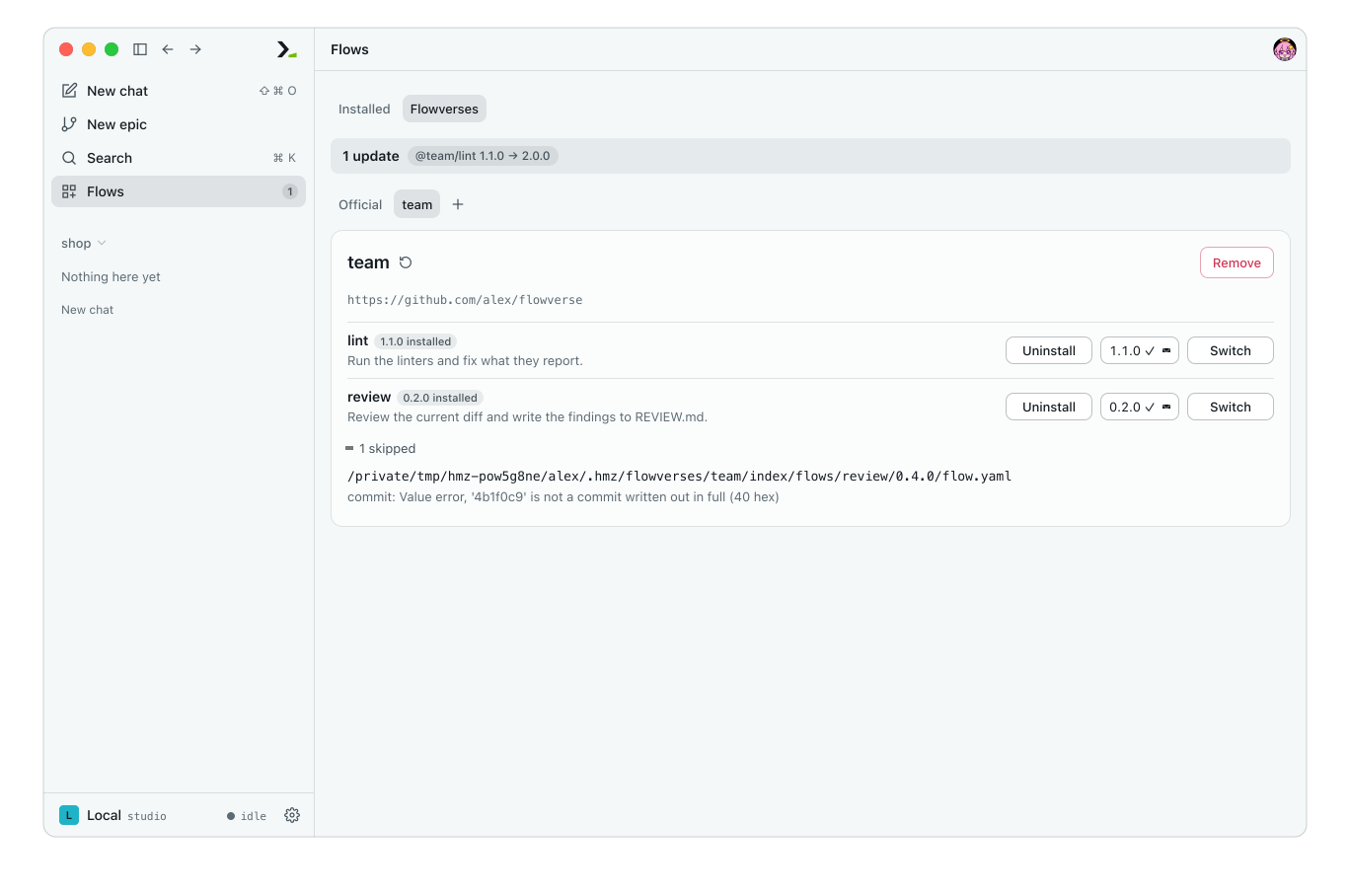
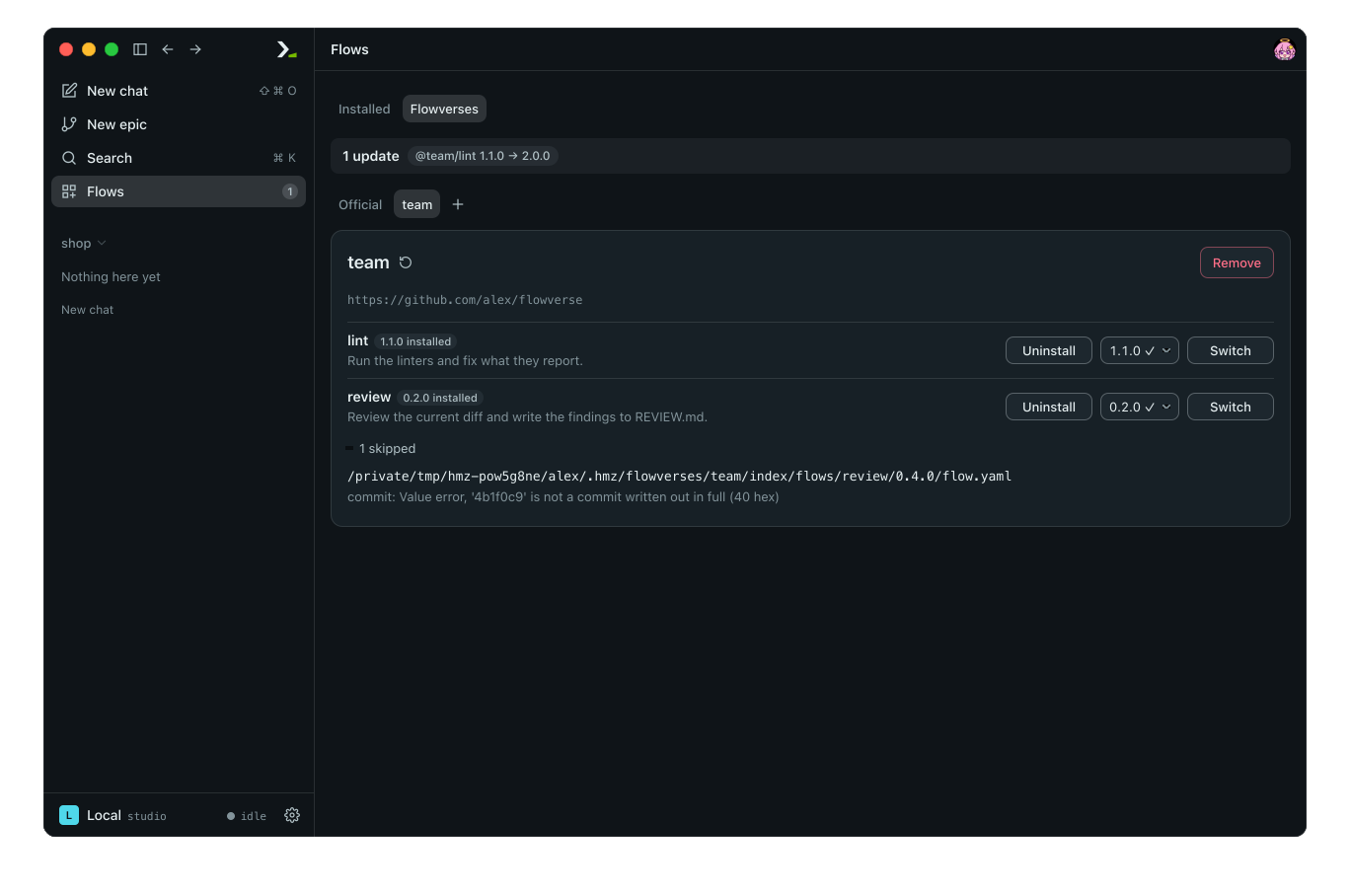
Open Flows, select the Flowverses tab, and click your flowverse to see its flows and releases. If Humanize cannot read a manifest, click the skipped line to see the file path and reason.
In the terminal
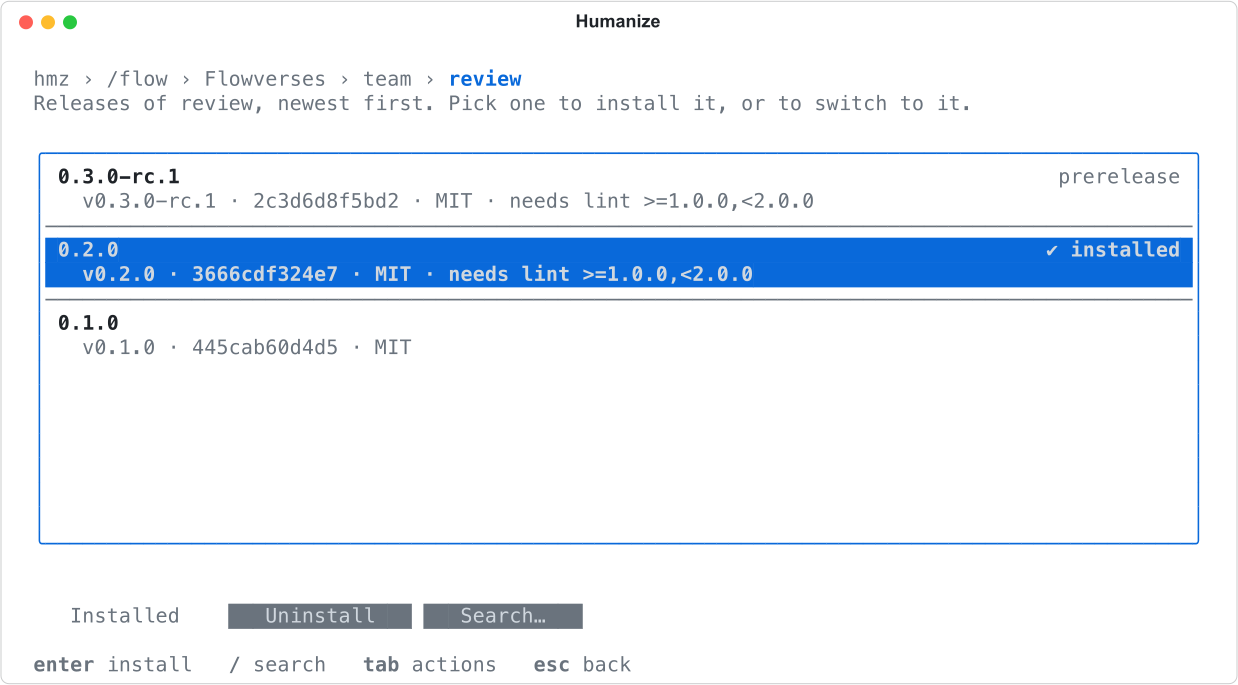
Type /flow and press enter. Press tab, then enter on Install more…. Select the flowverse and then the flow to see its releases listed newest first with their ref, commit, license, and dependencies.
From Python
Use Hmz().verses to manage flowverses from a script. This script adds an index, installs review, and prints any skipped manifests:
from hmz.sdk import Hmz

verses = Hmz().verses
verses.add("alex/flowverse", "team")

for one in verses.install("@team/review"):
    print("installed", one.called, one.version)

for bad in verses.index("team").skipped:
    print("skipped", bad.at.parent.name, "-", bad.why)

The index lists review up to 0.3.0-rc.1 and lint up to 2.0.0. The install picks 0.2.0 (the newest non-prerelease) and lint 1.1.0 (the newest within range).
| Call | Action |
|---|---|
verses.add(url, name) | Clones an index without installing flows. Defaults name to the repository name. |
verses.fetch(name) | Pulls the latest index so new releases appear. |
verses.index(name) | Returns index contents: flows(), versions(flow), newest(flow), and skipped. |
verses.install(flow, version) | Installs or switches to a release and its dependencies. |
verses.updates() | Lists installed flows that have newer releases available. |
verses.installed() | Lists all installed flows. |
verses.uninstall(flow) | Removes an installed flow. |
verses.remove(name) | Removes a flowverse and all flows installed from it. |
See The Python SDK for the full API.
Copy a flow to customize it
Copy an installed flow into your project instead of editing it in place, because updates overwrite installed flows. Copying places the flow, its sibling files, and its skills/ into .hmz/flows/ under the same name. Humanize checks project flows first, so the bare name resolves to your copy.
In the terminal
Run /flow, move to the flow under Installed, press tab, and choose Copy here. The app has no button for this. See Find and install flows.
From Python
import os

from hmz.sdk import Hmz

flows = Hmz().flows
print(os.path.relpath(flows.fork("@team/review")))
print(os.path.relpath(flows.find("review")))

fork returns the path to the new directory. Pass into= to copy to a different location. It raises ValueError if the source flow does not exist or the destination already exists.
To publish your modified flow, move the directory into its own repository and add a manifest to an index.
Good to know
- Keep flow imports free of side effects like network calls or file writes, because Humanize imports every installed flow to list it.
- Fetching an index updates available releases without changing installed flows, and discards any local edits to the index in
~/.hmz/flowverses/<name>/index/(installed flows live beside it ininstalled/). hmz execnever installs flows and refuses to run a listed flow that is not yet installed.- Pass
-f 'git+https://github.com/alex/review-flow@v0.2.0#review'to run a release directly by URL without installing it; see Call another flow. - The built-in flowverses
official,local, andusercannot be removed or used as names for added flowverses. A flowverse name uses letters, digits,.,_, and-. - Humanize skips any manifest that is missing a required key, has a
nameorversionthat does not match its directory, or uses a shortenedcommit. - Test your flow before tagging a release; see Test a flow.