Sessions and turns
Open a session with spawn and take a turn in it with run. A session is one conversation with one agent, and a turn is one prompt and the agent's work until it answers.
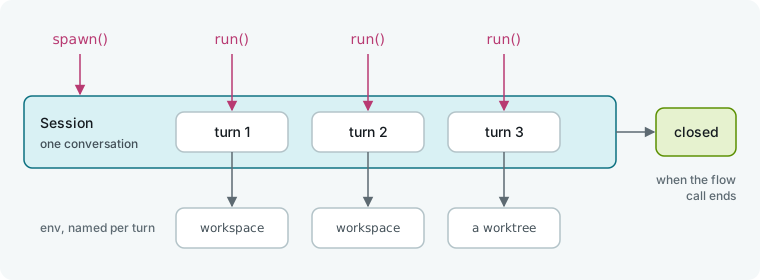
Open a session and take turns
Call spawn() on an agent, then pass that session to run. The agent remembers earlier turns in the same session, so your second prompt needs no repeated context.
# .hmz/flows/finish/__init__.py
from hmz.flows import (
    Agent,
    AgentCollection,
    EnvCollection,
    FlowContext,
    FlowParams,
    LocalEnv,
    flow,
)


class Agents(AgentCollection):
    coder: Agent


class Envs(EnvCollection):
    workspace: LocalEnv


@flow(agents=Agents, envs=Envs, params=FlowParams)
async def finish(
    task: str, *, agents: Agents, envs: Envs, params: FlowParams, ctx: FlowContext
) -> str:
    """A coder does the task, then says what it changed in one line."""
    coder, workspace = agents["coder"], envs["workspace"]
    session = await coder.spawn()
    await coder.run(task, session=session, env=workspace)
    line = await coder.run(
        "Say what you changed in one line.", session=session, env=workspace
    )
    return f"{line} ({session.usage.output_tokens} tokens written)"
spawn() takes no arguments and starts nothing; the agent's CLI starts on the session's first turn. run takes:
| Argument | Meaning |
|---|---|
prompt | What to tell the agent. |
session= | The session the turn is taken in. Required. |
env= | Where this turn works. None, the default, is the epic's own workspace. |
output_schema= | A pydantic model to get back instead of text. See Typed answers. |
budget= | A Budget for this turn alone. |
Run the flow from the CLI:
hmz exec -f @local/finish -a coder=claude/claude-haiku-4-5 \
    -p budget.output_tokens=20000 "Add a coupon code to checkout"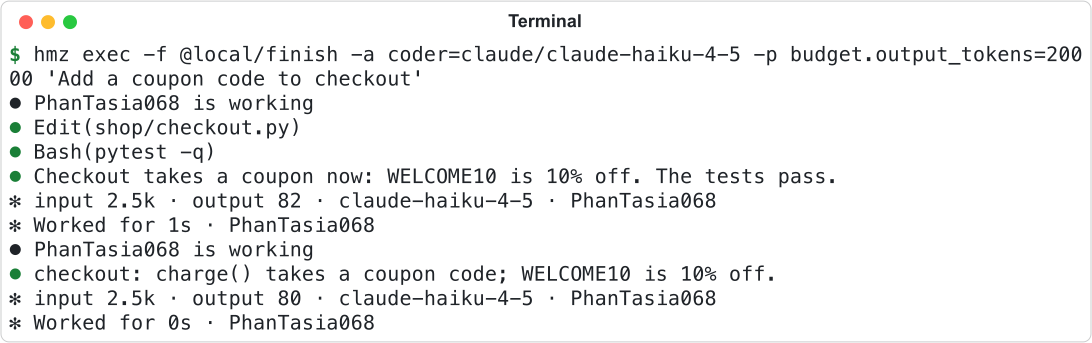
Two turns, one agent name: both went to the same session.
Open the epic in Humanize Desktop and select its session in the sidebar to see it as one thread: each prompt from the flow, followed by what the agent did and said.
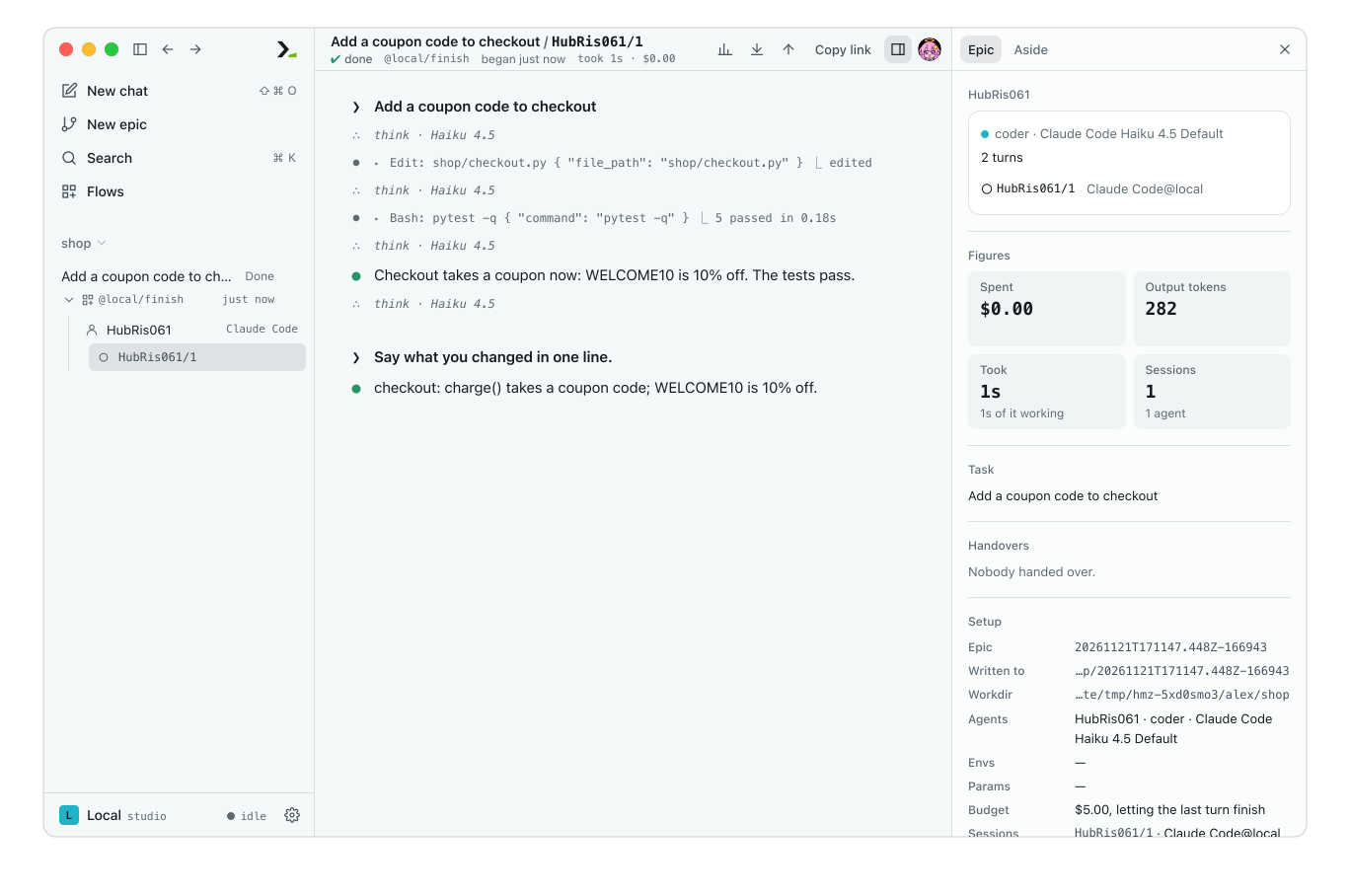
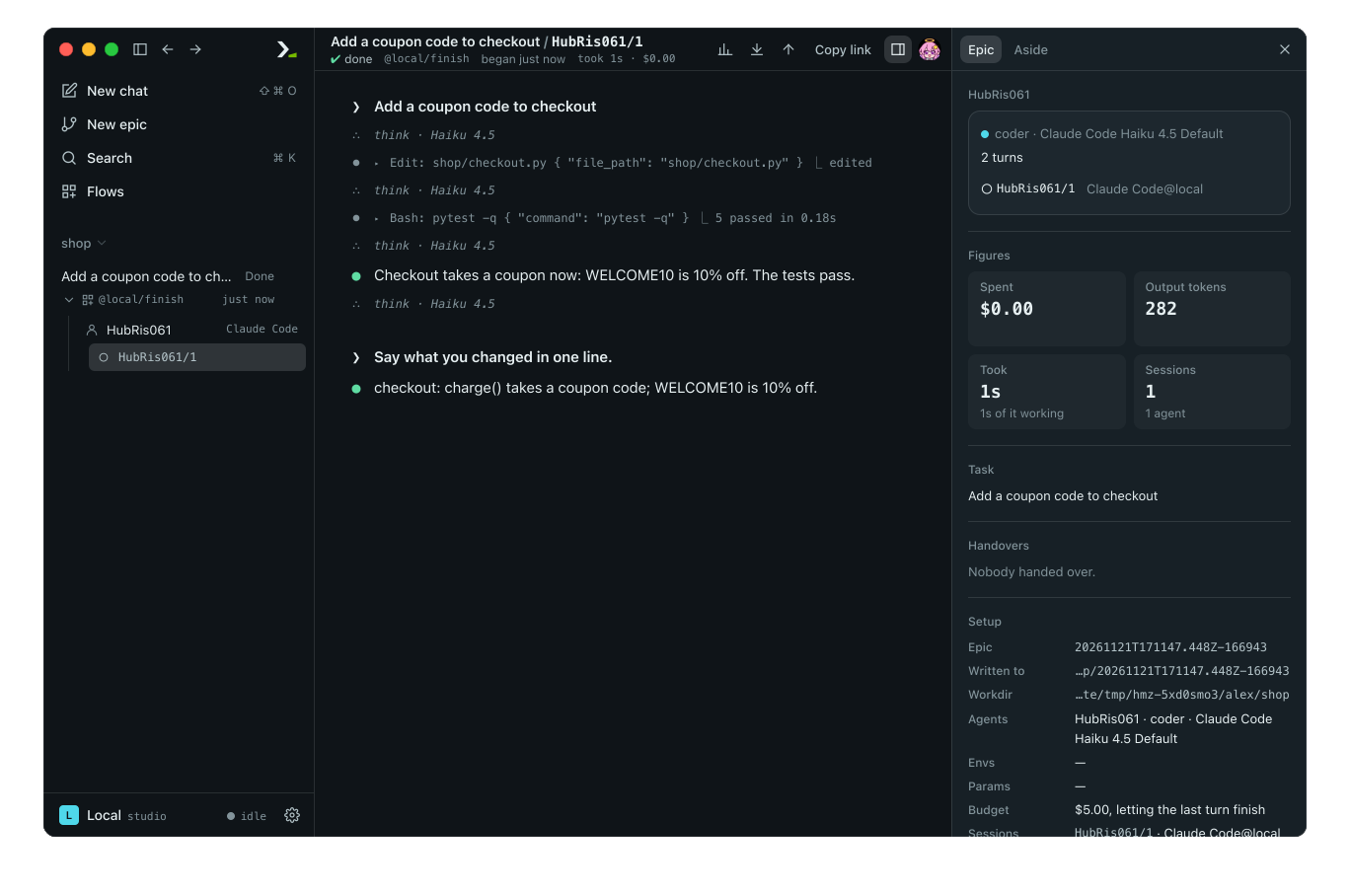
One session, two turns.
Read the turn's answer
run returns the text of the agent's last message as a str. Pass output_schema to get an instance of that model instead, or OutputSchemaError if the answer does not fit.
Tool calls and file edits stay in the environment and the epic's record, not in the return value.
Read session usage and follow session rules
Read session.agent and session.usage to inspect a session.
| Property | Value |
|---|---|
session.agent | The agent whose conversation this is. |
session.usage | A Usage: what the session's turns have spent so far. |
Usage has three live fields: duration (a timedelta of time spent in turns), cost (USD), and output_tokens. Read ctx.usage for the whole flow call's spend; see Budgets in a flow.
Sessions follow these rules:
- Run one turn at a time per session. A second
runon a busy session raisesSessionError. - Run concurrent turns by opening two sessions on the same agent. See Concurrent turns.
- Hold the session in a variable while you have turns left. You never close a session yourself; it closes when the flow call ends or nothing references it.
- Open a fresh session inline with
session=await coder.spawn()when a turn needs no memory of earlier ones. - Pass
envon each turn, not on the session. Moving a session to another directory on a later turn works only on some harnesses; see Machines and moving sessions. - Continue from one point in two directions by branching; see Branch a conversation.
Cap one turn
Pass budget= to run to limit a single turn. The turn obeys whichever leaves less between its own budget and the flow's budget.
import datetime

from hmz.flows import Budget, BudgetExceeded

try:
    notes = await coder.run(
        "Write the release notes.",
        session=session,
        env=workspace,
        budget=Budget(duration=datetime.timedelta(minutes=5), graceful=False),
    )
except BudgetExceeded as spent:
    if not spent.own:
        raise  # the flow's budget is spent: every later turn would raise too
    notes = ""
Set at least one of duration, cost, or output_tokens on Budget:
- Set
graceful=Falseto stop the agent at the limit and raiseDurationExceeded,CostExceeded, orOutputTokensExceeded(all subclasses ofBudgetExceeded). - Leave
graceful=True(the default) to let a turn finish and return normally when it hits its own limit. - Check
spent.ownwhen catchingBudgetExceeded.Truemeans only this turn's budget ran out, so the flow can take another turn in the session;Falsemeans the flow's or caller's budget is spent.
Steer a running turn
Call steer on an agent with SteeringAgentMixin to send words into a running turn.
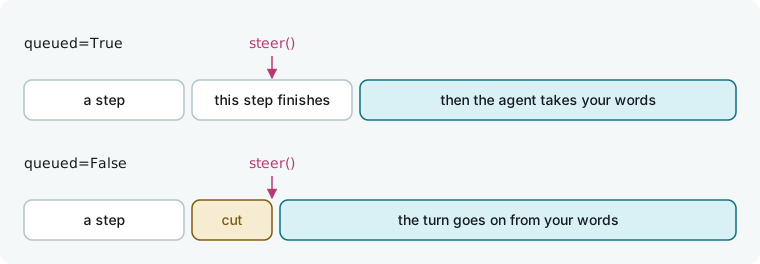
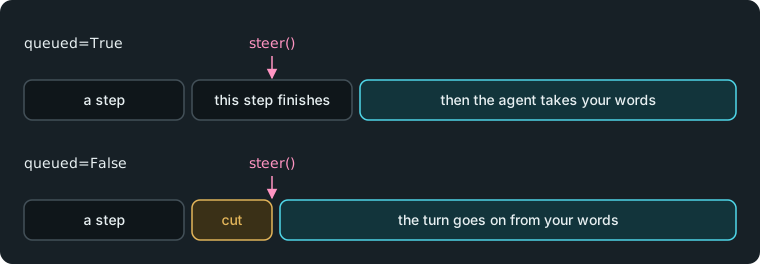
Start the turn as a task, then call steer:
import asyncio

from hmz.flows import Agent, AgentCollection, SteeringAgentMixin


class Coder(Agent, SteeringAgentMixin):
    """A coder the flow can steer."""


class Agents(AgentCollection):
    coder: Coder


# in the flow function
turn = asyncio.create_task(coder.run(task, session=session, env=workspace))
done, _ = await asyncio.wait({turn}, timeout=600)
if not done:
    await coder.steer("Wrap up: keep what works and stop.", session=session)
answer = await turn| Argument | Meaning |
|---|---|
prompt | What to say. |
session= | The session whose turn it is. Required. |
queued= | True, the default: the agent takes the words when it next looks, and carries on. False: the current step is interrupted and the turn goes on from the words. |
steer returns None immediately, while run still returns the turn's final answer. steer raises SessionError if the session is another agent's, is closed, or has no turn running, and CapabilityNotGranted if the role lacks SteeringAgentMixin.
Use one of the harnesses that support steering: claude, codex, kimi, pi, or omp. Assigning any other harness to a role with SteeringAgentMixin fails before the flow starts with CapabilityMissing.
Steer a running turn manually from the app or terminal; see Talk to a running flow.
Handle turn errors
Import turn exceptions from hmz.flows.
run raises | When |
|---|---|
SessionError | The session is another agent's, is closed, or is already taking a turn. Also when the turn was interrupted, a hook blocked the prompt, or the env's directory does not exist. |
CapabilityNotGranted | The prompt starts with /goal or /loop and the role lacks the mixin. See Goals. |
BudgetExceeded | A budget over the turn is spent, before or during the turn. A flow's budget, once spent, stays spent. |
FlowCancelled | The epic, or the flow that called this one, has already ended. spawn and steer raise it too. |
UnsupportedOperation | The harness cannot do this, such as carry the session to another machine. |
OutputSchemaError | The answer does not fit output_schema. |
HarnessNotInstalled, HarnessMissing, HarnessSandboxed | The CLI is not installed, would not start, or could not set up its sandbox. |
HarnessRefused, HarnessThrottled, ModelUnavailable | The provider refused the credential, the rate or quota, or the model. |
HarnessContended, HarnessKilled, HarnessDropped | Another turn held the CLI's local store, the CLI died, or the connection broke. |
HarnessUnrecoverable | The turn failed for a reason no retry would change. |
Catch HarnessError to handle any failed turn. Every exception in the table except CapabilityNotGranted, BudgetExceeded, and FlowCancelled inherits from HarnessError. This example falls back to a backup role when throttled:
from hmz.flows import HarnessError, HarnessThrottled

try:
    answer = await coder.run(task, session=session, env=workspace)
except HarnessThrottled:
    answer = await backup.run(task, session=await backup.spawn(), env=workspace)
except HarnessError as failed:
    answer = f"The coder could not answer: {failed}"
Cancel the task awaiting run to interrupt the agent and raise asyncio.CancelledError. See Context, errors and cleanup for the full exception tree.
Test a session
Use a scripted agent to answer each turn from a list and record prompts and sessions. See Test a flow.
# tests/test_finish.py
from hmz.sdk import fakes


async def test_both_turns_go_to_one_session() -> None:
    coder = fakes.FakeAgentDriver(
        reply=["Added it.", "checkout: takes a coupon code."], output_tokens=40
    )

    said = await fakes.run_fake("finish", "add a coupon", agents={"coder": coder})

    assert said == "checkout: takes a coupon code. (80 tokens written)"
    assert len(coder.sessions) == 1
    assert coder.prompts == ["add a coupon", "Say what you changed in one line."]
Read coder.sessions[0].steered to inspect every steer sent to the session and its queued flag.
Good to know
- Agents never pause for approval. Limit what a turn can do with role permissions and hooks; see Skills and permissions and Hooks.
- Calling
steerbefore the turn starts raisesSessionError. Wait before steering, as shown in the example. - Omit
envfor alitellmagent; it has no workspace and raisesUnsupportedOperationif given one. - Passing an
envthat the epic did not provide to the flow raisesTypeError. - Humanize calculates cost from its price table. A model missing from the table reports a cost of 0, so cap it with
durationoroutput_tokens. - Repeat turns until a condition holds with Loops.