Machines and moving sessions
Declare the resources an environment role needs, or move a session between environments across turns. You can also use the underlying Python API to send an agent's work to another machine without a flow.
Declare what a machine needs
Add resource mixins to an environment role and set their class attributes. The person running the flow picks the machine; the role defines what that machine must provide.
# .hmz/flows/train/__init__.py
from hmz.flows import (
    Agent,
    AgentCollection,
    CPUEnvMixin,
    Env,
    EnvCollection,
    FlowContext,
    FlowParams,
    GPUEnvMixin,
    ImageEnvMixin,
    MemoryEnvMixin,
    ShellEnvMixin,
    flow,
)


class Agents(AgentCollection):
    coder: Agent


class Box(Env, ShellEnvMixin, CPUEnvMixin, MemoryEnvMixin, GPUEnvMixin, ImageEnvMixin):
    """Where the training runs."""

    _cpu_count = 4
    _memory = 8 << 30  # bytes: 8 GiB
    _gpu_count = 1
    _gpu_memory = 24 << 30  # bytes per GPU
    _image = "pytorch/pytorch:latest"


class Envs(EnvCollection):
    box: Box


@flow(agents=Agents, envs=Envs, params=FlowParams)
async def train(
    task: str, *, agents: Agents, envs: Envs, params: FlowParams, ctx: FlowContext
) -> str:
    """Do the task on a machine with a GPU."""
    coder, box = agents["coder"], envs["box"]
    session = await coder.spawn()
return await coder.run(task, session=session, env=box)| Mixin | Attribute | Meaning | Default once the mixin is declared |
|---|---|---|---|
CPUEnvMixin | _cpu_count | Fewest logical CPUs | 1 |
MemoryEnvMixin | _memory | Fewest bytes of memory | 0 |
GPUEnvMixin | _gpu_count | Fewest GPUs | 1 |
GPUEnvMixin | _gpu_memory | Fewest bytes of memory per GPU | 0 |
ImageEnvMixin | _image | The image a container for the role starts from, as docker run takes it | "" |
A role without a mixin makes no requirement of that kind.
How each environment handles resources
Pass the environment with -e, such as -e box=local/~/shop or -e 'box=ssh@[alex@gpu-box]/srv/shop'. Each environment type handles these attributes differently:
| Environment | CPUs, memory, GPUs | _image |
|---|---|---|
local, ssh | Minimums. Humanize measures the machine before the run and refuses it if too small. GPUs come from nvidia-smi, narrowed by CUDA_VISIBLE_DEVICES. | Ignored |
docker | Exact limits: --cpus, --memory, and GPUs assigned by ID. A role without GPUEnvMixin gets no GPU. | Used |
swarm | Service reservation and limit. | Used |
apple-container | The container's CPUs and memory. Any GPU request is refused because Apple containers have none. | Used |
slurm | Submitted as --cpus-per-task, --mem and --gpus. | Ignored |
If _image is "", the container uses the saved runtime's image, or python:3.12-slim if the runtime sets none. The image needs only /bin/sh and no Humanize installation.
See Runtimes for saved runtimes and fallbacks, and Environments and runtimes for the -e syntax.
Handle machines that are too small
Humanize refuses an undersized environment with ResourceUnmet before starting any agent. On the command line, you see a one-line error:


If your flow calls another flow with an undersized environment, the call raises ResourceUnmet, which you can catch.
Move a session between environments
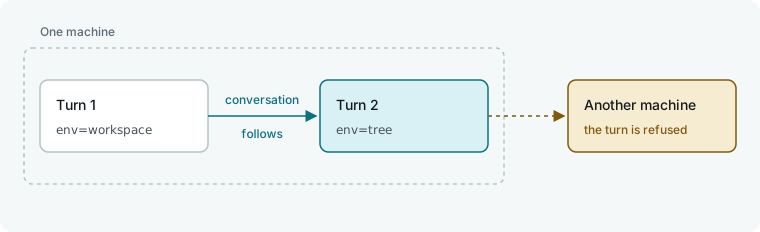
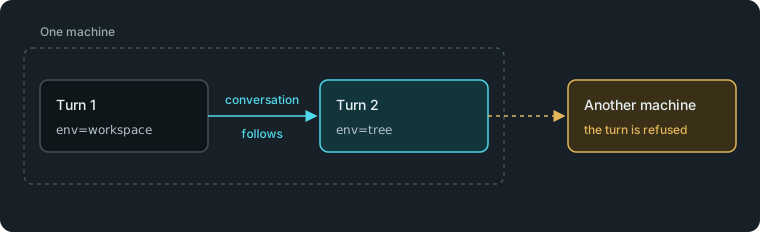
Pass a new environment to env= on the next turn of the same session. Because env= belongs to the turn, the conversation moves with it.
# .hmz/flows/plan_then_build/__init__.py
from hmz.flows import (
    Agent,
    AgentCollection,
    EnvCollection,
    FlowContext,
    FlowParams,
    GitWorktreeEnvMixin,
    LocalEnv,
    flow,
)


class Agents(AgentCollection):
    coder: Agent


class Workspace(LocalEnv, GitWorktreeEnvMixin):
    """The project. The flow may add worktrees of it."""


class Envs(EnvCollection):
    workspace: Workspace


@flow(agents=Agents, envs=Envs, params=FlowParams)
async def plan_then_build(
    task: str, *, agents: Agents, envs: Envs, params: FlowParams, ctx: FlowContext
) -> str:
    """Plan in the project, then build in a worktree, in one conversation."""
    coder, workspace = agents["coder"], envs["workspace"]
    session = await coder.spawn()
    await coder.run(
        f"Plan this. Change nothing yet.\n\n{task}", session=session, env=workspace
    )
    tree = await workspace.derive_worktree()
    return await coder.run("Now build it here.", session=session, env=tree)
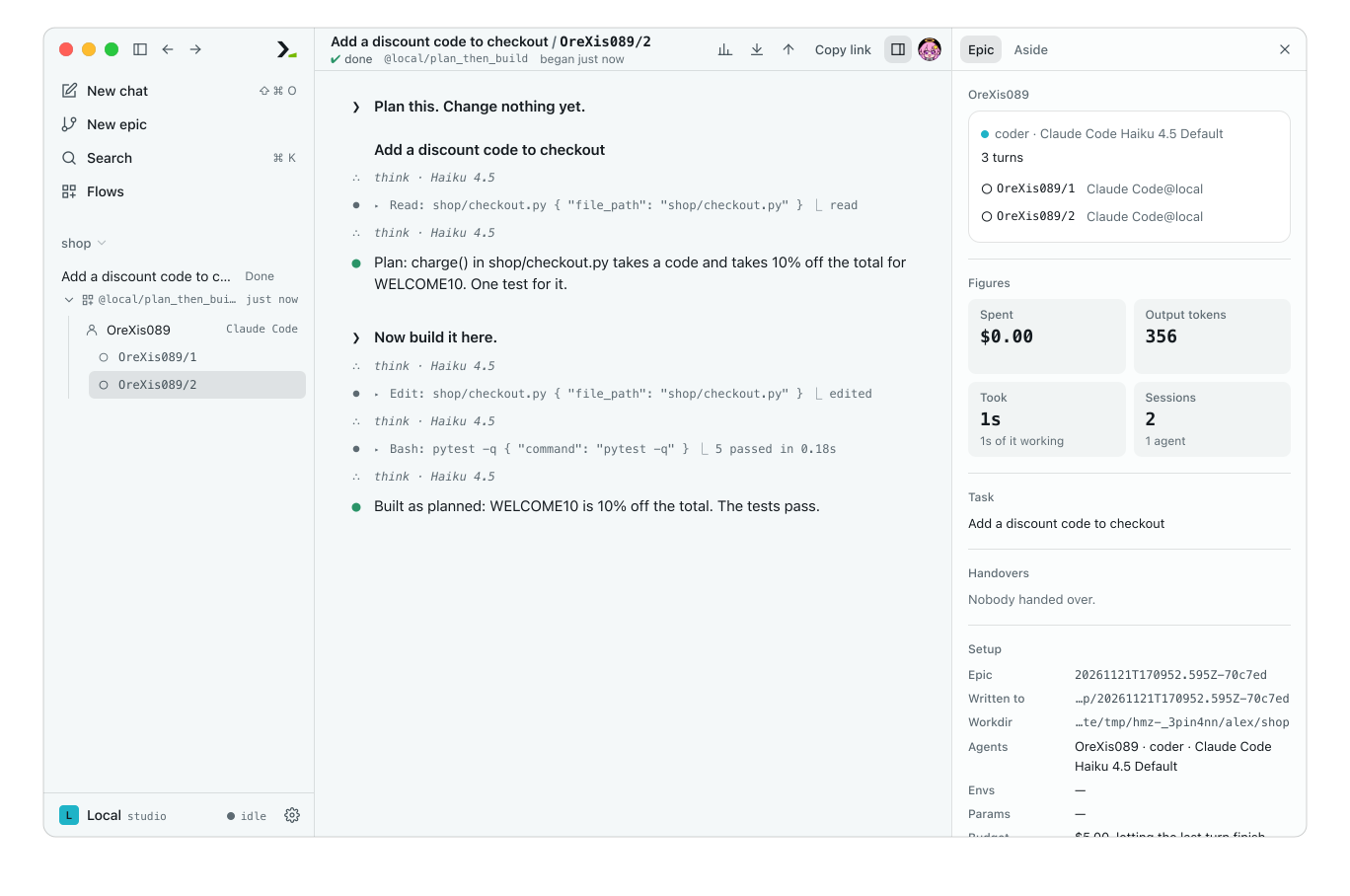
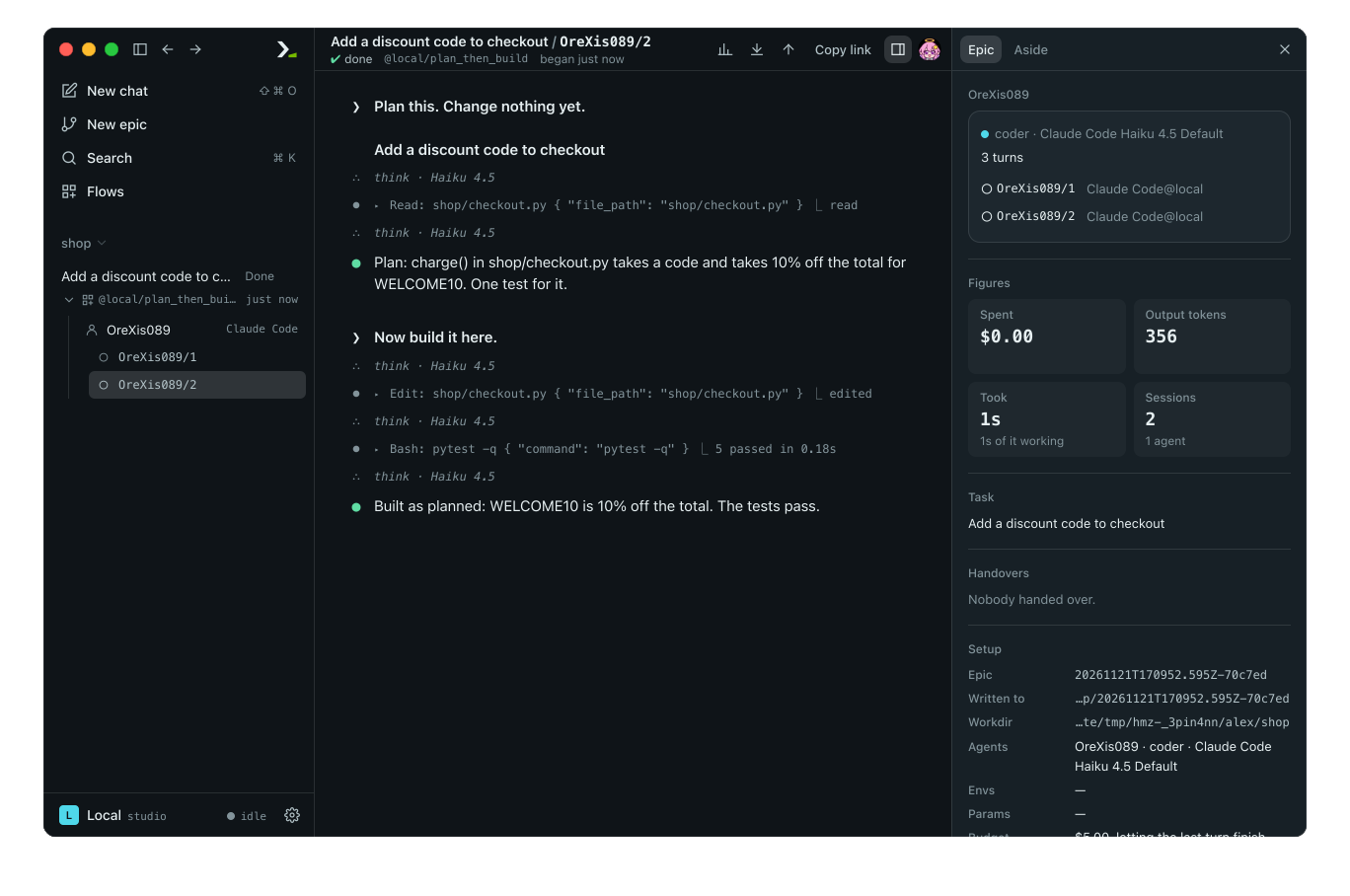
The second turn retains the plan and writes its edits in the worktree. The harness forks the conversation into the new directory, so the run records a second conversation starting with the full history of the first.
In the app
Run the flow and open its epic. You see two sessions under the single agent, and the second session shows both the plan and the build turns.
From the command line
Run the flow with hmz exec to see the move printed as a second conversation:
hmz exec -f @local/plan_then_build -a coder=claude/claude-haiku-4-5 -p budget.output_tokens=20000 'Add a discount code to checkout'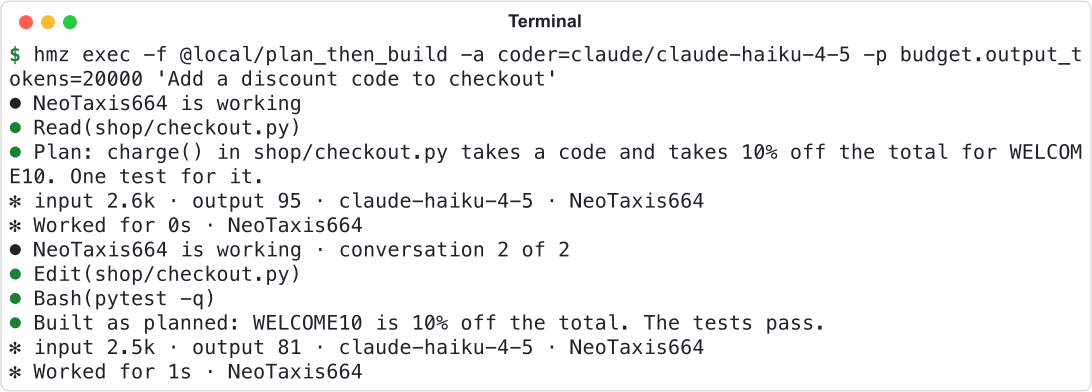
Where a session can move
The next turn's env is | What happens |
|---|---|
| The same environment | The session continues. |
| Another workdir on the same machine | claude, codex and kimi move the conversation there. Other harnesses raise UnsupportedOperation. |
| On another machine | Every harness raises UnsupportedOperation. |
A refused turn leaves the session in its previous environment. Catch UnsupportedOperation to run the turn in the old environment, or call spawn() for a new session and run that in the new one. See Branch a conversation to explore multiple paths, and Worktrees, clones and scratch for worktrees.
Reach another machine from Python
Use hmz.coganchor to run an agent's work on another machine from your own Python code without a flow.
TIP
Do not use it inside a flow. A flow never chooses a machine: its environments do, and Humanize anchors each turn there for you.
from hmz.coganchor import AnchorConfig, check, connect, drive
from hmz.coganchor.machines import Mapped

box = AnchorConfig(target="ssh://gpu-box", workspace="/srv/shop")

print(check(box)["entries"])  # connects, runs nothing: how many entries the workspace holds

with Mapped(box) as there:  # the workspace, from this process
    there.write_text("notes.txt", "start here")
    ran = there.run(["pytest", "-q"])
    print(ran.ok, ran.status, ran.output)

connect(["claude", "--print", "fix the failing test"], box)  # the agent runs here
drive(["claude", "--print", "fix the failing test"], box) # the agent runs there| Call | What it does | Returns |
|---|---|---|
check(config) | Queries the target without running commands. Raises OSError if the target cannot be reached or the workspace is not there. | A dict with hostname, platform, version, exports, target, workspace, entries and more |
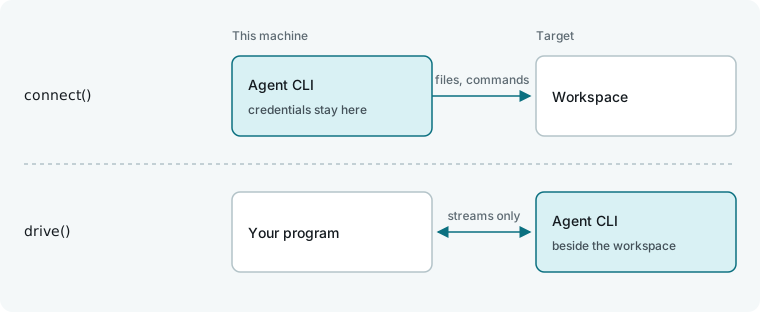
connect(command, config) | Supervises the agent locally (Linux required) while executing its file operations and commands on the target. Credentials stay local. | The agent's exit status |
drive(command, config) | Runs the CLI installed on the target and forwards its three streams. Raises hmz.coganchor.anchor.NotInstalled if missing. | The CLI's exit status |
Mapped(config) | Exposes the target's workspace via read_text, read_bytes, write_text, write_bytes, listdir, exists, mkdir, remove, and run (returns a Ran with argv, status, output and ok). |
Format a target as ssh://[USER@]HOST[:PORT], docker://CONTAINER, apple-container://CONTAINER, slurm://JOBID, tcp://HOST:PORT, peer://TICKET@HOST:PORT or local[:DIR]. An invalid format raises ValueError when creating AnchorConfig. check, connect and Mapped require no pre-installed software on the target because Humanize copies its own helper binary over.
Configure AnchorConfig
Pass keyword arguments to construct a frozen AnchorConfig. These match the flags on hmz internal anchor in the CLI reference.
| Field | Default | Meaning |
|---|---|---|
target | "local" | The machine where work executes. |
workspace | this directory | The project directory path on the target. |
remote_path | None | Actual workspace path on the target, if different from workspace. |
chdir | None | Starting subdirectory inside the workspace. |
harness | "local" | Where the agent process runs: local, same (the target), or another target string. |
broker | "" | Rendezvous address when harness and target are separate remote machines. |
native | False | Run the CLI installed on the target, like drive. Incompatible with a non-local harness. |
shadow | None | Mirror directory on the harness machine. Defaults to the workspace path. |
force | False | Allow a mirror directory that already contains unrelated files. |
local_paths | () | Workspace paths kept on the local machine. |
local_execs | () | Paths to programs that execute locally instead of on the target. |
redirects | () | Pairs (path the agent names, path it gets). |
private | () | Agent environment variables hidden from commands on the target. |
net | "local" | Network used for the agent's own connections: local or remote. Subprocesses always use the target's network. |
net_allow | () | HOST[:PORT] entries kept local when net is remote. |
token | None | Shared secret for a tcp:// target. Falls back to HUMANIZE_TOKEN. |
fence | None | Sandbox limits enforced on both machines. See The sandbox. |
hushes | () | Native: environment variables unset on the target during the turn. |
projects | () | Native: (variable, local directory) credentials copied to the target for the turn and deleted afterward. |
brings | () | Native: (VARIABLE/PATH, local directory) files retrieved from a projected directory after the turn. |
tells | "" | Native: local directory written with the target paths of projected variables. |
home | None | Virtual home directory for the CLI. |
installs | "" | Installation command shown in the NotInstalled error. |
Read config.capabilities to inspect the connection mode without connecting: anchor:supervised, anchor:native-cli, and anchor:afar when the harness runs remotely.
Start a managed machine for an agent
Set machine on an AgentConfig (from hmz.coganchor.agents) below the flow API to control where an agent's turns run (None uses the local machine). Humanize starts a managed machine on the agent's first turn and stops it when the agent object is gone, leaving the workspace intact.
Config, from hmz.coganchor.machines | The machine |
|---|---|
AnchoredConfig(anchor=...) | An existing machine. Call hmz.coganchor.agents.anchored("ssh://box") to build one from a target string. |
DockerConfig | A new container configured with image, cpus, memory, gpus, endpoint and more. |
AppleContainerConfig | A new Apple container on this Mac. |
SwarmConfig | A new swarm service. |
SlurmConfig | A new Slurm job. |
Call allocations(endpoint="local") to list running Humanize Docker containers as Allocation objects (name, cpus, memory, gpus, labels). Inspect other backends with services() and nodes() on swarm, allocations() on apple_container, and jobs() on slurm. For Docker, info(endpoint) returns what the daemon reports, and gpus_listed() and gpus_usable() read its GPUs; apple_container.status() reports this Mac's container system, and apple_container.capacity(status) reads the CPUs and memory it can hand out from that. Read capabilities on a machine config to see what it promises before anything starts: remote, isolated, managed, and linux or darwin, plus the anchor's own words. To support a custom machine type, subclass MachineConfig (implement create()) and MachineBase (implement start() to return an AnchorConfig, and stop()).
Good to know
- Containers and jobs also start before the flow's first line, so a refusal uses zero tokens.
- Setting
CUDA_VISIBLE_DEVICESto an empty string onlocalorsshreports 0 GPUs. - A
dockerruntime attached to an already-running container ignores_image. - A
LocalEnvrole always uses the local workspace; passing a remote environment to a callee'sLocalEnvrole raisesCapabilityMissing. - A
litellmagent does not acceptenv=and raisesUnsupportedOperationfor any environment. - Running an agent's CLI on a different machine than its workspace raises
UnsupportedOperationif the project configuration launches programs such as hooks or MCP servers. See The sandbox. - In tests,
run_fakeprovides a large enough fake machine for any omitted role. PassFakeEnvDriver(gpu_count=0)to triggerResourceUnmet. See Test a flow.