The sandbox
Agents never ask for approval. Instead, the sandbox enforces the agent's permission by putting an operating system fence around the agent and every command it runs.
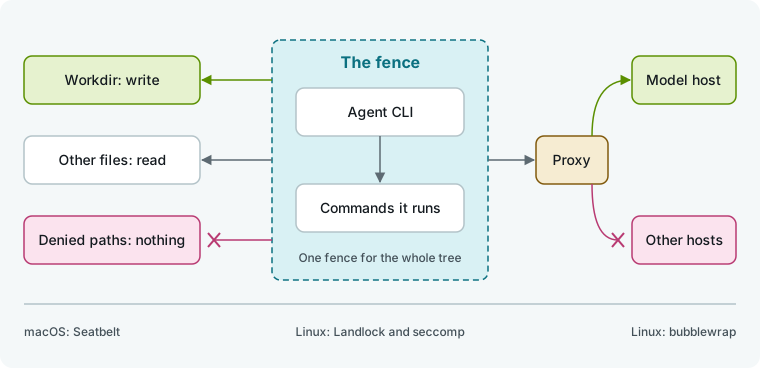
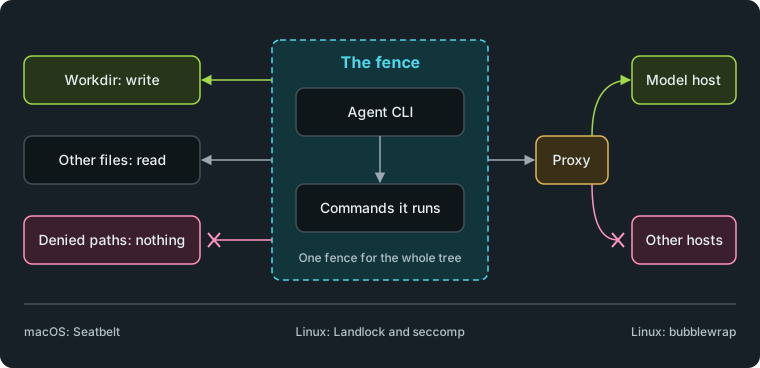
The fence with the default permission and the network cut.
What the fence holds
Every agent with a restricted permission runs inside a fence in both chats and flows. Only Full access with the network on, and no path rule that takes anything back, runs without a fence.
- The fence holds the agent CLI and its entire process tree, including any scripts the agent writes and runs.
- Each path is held to what the permission allows: write, read, or nothing.
- The agent can always read files needed to start programs (system programs, libraries, certificates). It can always write its own settings and sign-in, its sessions, devices, and its own scratch directory (
TMPDIR). - When the permission lets the agent write its workdir, it can also write
/tmpand/var/tmp. - Humanize never runs an agent with wider access than its permission. If the machine cannot put the fence up, Humanize refuses the session before its first turn.
See a refusal
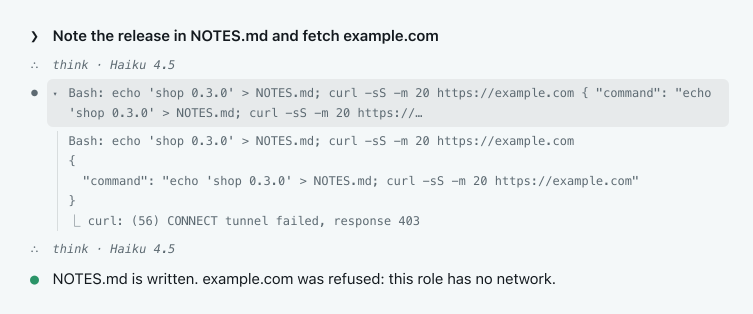
A refused command fails with standard errors like permission denied or a failed connection. The agent reads the error and carries on.
In the app
Open the agent's session and click a command to see its output. Here, a role with no network writes a file in its folder, and then the fence refuses curl.
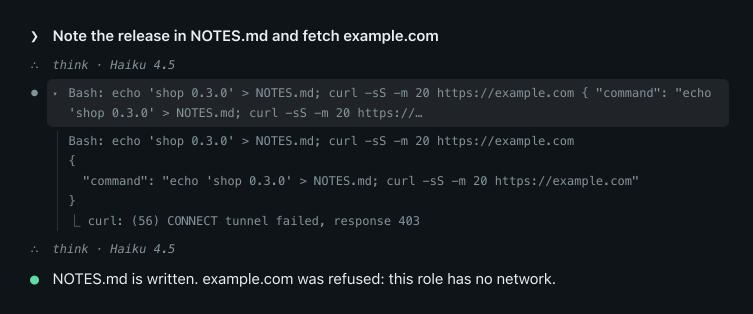
From the command line
Run hmz exec to see the same turn printed in the terminal. This project flow has one role with no network.


What enforces it
| System | Backend | Needs |
|---|---|---|
| macOS | Seatbelt | Humanize must not itself run inside another sandbox |
| Linux | Landlock, with seccomp | kernel 5.13 or later with Landlock enabled; kernel 6.7 or later to cut the network |
| Linux | bubblewrap | a bwrap program that starts on this machine |
On Linux, Humanize uses Landlock when it can enforce the permission, and bubblewrap otherwise.
Cut the network
Give a role no network in a flow to restrict its connections (network=False, see Skills and permissions). You cannot set this for a chat. The agent can then reach only its model and sign-in hosts, plus what its account points it at: a gateway endpoint, or the cloud hosts of an account on Bedrock, Vertex or Foundry. The fence refuses all other connections, including package indexes, web pages, and hosts named in commands.
- A local proxy passes only the allowed hosts, and
HTTPS_PROXYinside the fence points to it. If your machine uses an upstream proxy, Humanize reaches the model through it. - Humanize switches off the agent's built-in web search when its CLI supports it.
- On Linux, programs the agent runs can listen on loopback only. On macOS, they can listen on any address, but can still connect only to the proxy.
- Humanize refuses
cursor-agentandmcodefor roles with no network because their web search runs on vendor servers. Give the role another CLI. - Any custom CLI you add must declare its
hosts, or Humanize refuses it for roles with no network.
Choose the backend on Linux
Set sandbox.backend in ~/.hmz/settings.yaml to pin a backend on Linux. You must edit this file by hand; the change applies from the next turn, with no restart.
sandbox:
backend: bwrap| Value | Meaning |
|---|---|
auto | Landlock where it can hold the permission, bubblewrap otherwise. The default |
landlock | Landlock only |
bwrap | bubblewrap only |
If a pinned backend cannot start, it refuses the role instead of falling back. Unrecognized values act as auto. macOS ignores this setting.
Let Codex use its own sandbox
You can let Codex enforce the permission with its own sandbox instead of the fence:
sandbox:
  native: [codex]
WARNING
This is a trade, not a default. Codex's sandbox limits what the commands it runs may write and whether they reach the network. It does not limit Codex itself, the MCP servers and hooks it starts, or what anything reads.
Humanize honors only codex and fences any other name in the list as usual. Codex still runs in the Humanize fence when the permission takes a path back under a wider rule, when Codex's sandbox cannot start on this machine, when the work is on another machine, or when a flow checks each permission request. When Codex uses its own sandbox, its session shows a notice, once per agent, starting with codex: held to its permission by Codex's own sandbox.
Work on another machine
Work in a container or on an SSH host follows the same permission. Each machine fences its own workdir and home. Humanize checks the remote machine's capabilities before opening the session and refuses to start if it cannot fence.
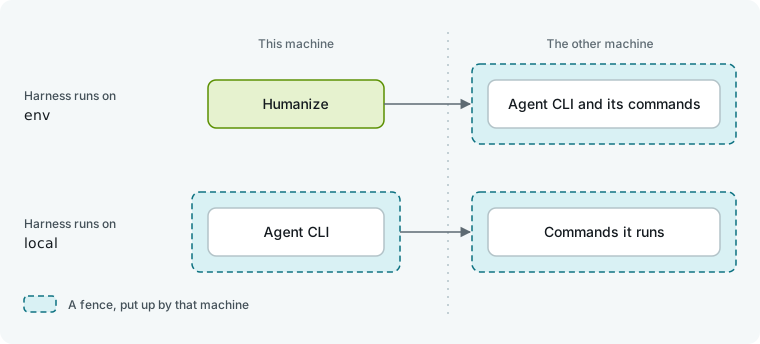
The runtime's Harness runs on setting controls where the fences run. See Runtimes.
| Harness runs on | Fenced |
|---|---|
env | the agent CLI and its commands, on the other machine. That machine needs Seatbelt, Landlock or bubblewrap |
local | the agent CLI here, by Landlock, whatever sandbox.backend says (this machine must be Linux); its commands on the other machine |
| another runtime | nothing can be fenced: only a role with Full access and the network may run so |
- The remote machine chooses its own backend and ignores your local
sandbox.backendsetting. - With the network cut and the harness on
local, the commands on the other machine reach no host at all. Onenv, they share the CLI's fence and its allowed hosts. - A container whose seccomp profile blocks Landlock can fence only with a bubblewrap that starts there.
A project's own programs
Projects can configure their CLI to start programs like hooks, MCP servers, plugins, or key helpers. The CLI runs these programs on its own host machine. If the CLI runs on a different machine than the work, it would start the project's programs on a machine that never agreed to run them. Humanize refuses the session and lists the offending files and keys, such as .codex/config.toml: hooks. To fix this, set Harness runs on to env, or remove those entries from the project.
Good to know
- The fence does not block connections to Unix sockets (like a container daemon or session bus) or macOS Mach services. An agent can ask those listening processes to act on its behalf.
- A refused session fails with
HarnessSandboxedand names what the machine lacks. Humanize never retries it on the same nous. A turn where the CLI itself is blocked from a required host fails asfenced. - On Linux, bubblewrap requires any denied path under a wider rule to already exist, or the session is refused.
- Inside a container that forbids process tracing, or when Yama's
ptrace_scopeis 2 or 3, Landlock cannot cut the network. Bubblewrap can. - On Linux, Ai-chan requires bubblewrap. If Humanize selects Landlock, it refuses her with a message to set
sandbox.backendtobwrap. - Calling a model directly through
litellmuses no CLI, so nothing is fenced. - For unexplained refusals, see Troubleshooting.